Archive
PLEASE Citrix fix integration with Azure Stack! – #AzureStack, #CitrixCSP, #CitrixSynergy, #MSIgnite
Hi,
Ok, Microsoft have made some really cool announcements of Azure Stack, yes STACK not Pack. Azure Stack is NOT version 2.0 of Windows Azure Pack.. this is really important to note!
Azure Stack is basically the Azure technology used by the public Azure cloud but you can take that on-premise to your datacenter to deliver your own Azure cloud. No need of VMM or the traditional Fabric Management infrastructure!
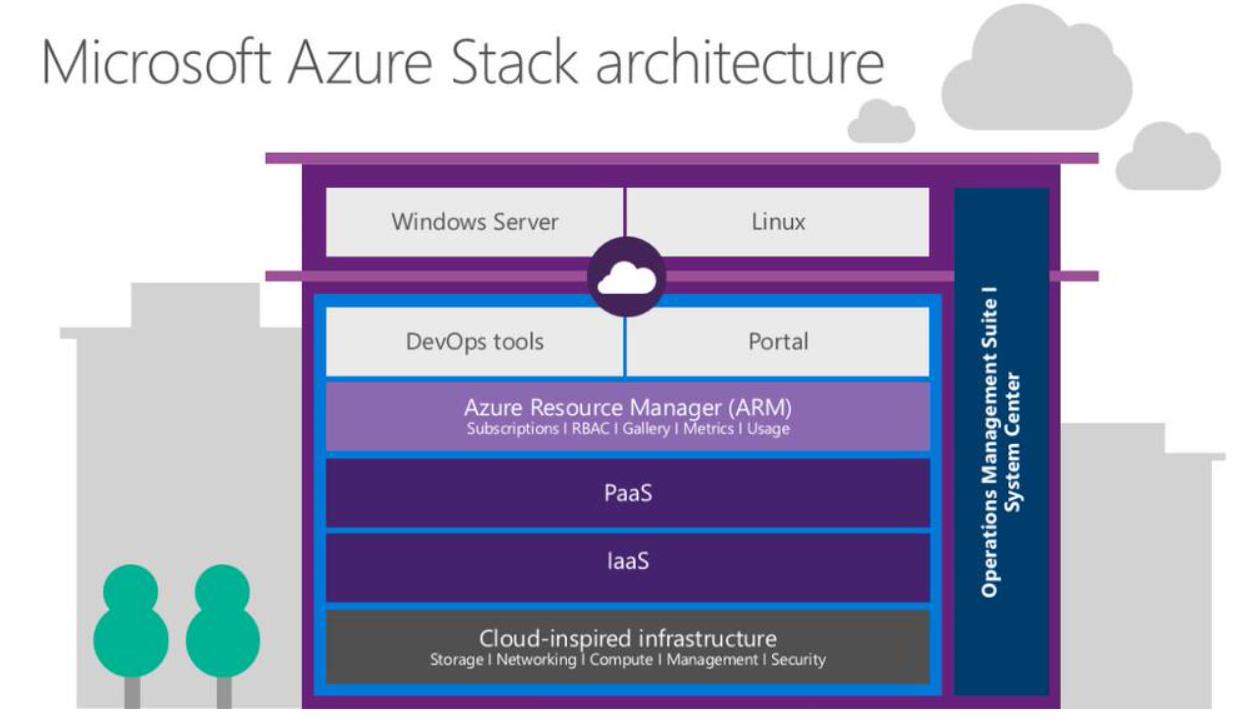
This is how Microsoft puts it:
Microsoft Azure Stack brings proven innovation from Microsoft’s hyper-scale public cloud into your datacenter, providing agility and productivity for application owners, flexibility and control for IT, and assurance that corporate assets are protected.
So then we come to the topic of this post, if we know get this really 1st class IaaS and PaaS capabilties on-premise using Azure Stack HOW can we then leverage that to provision Desktop-as-a-Service offerings with Citrix XenApp/XenDesktop on top of it?
My dream would of course be that Citrix provides Workpace Services and the main XenApp/XenDesktop infrastructure as a SaaS service, and that you internally just build your Azure Stack Resource Groups with all components needed for the DaaS tenant (network, storage, AD, VM’s to slap the VDA on etc.) using Visual Studio to leverage intellisense and builtin objects/IDE capabilities to add resources to your json deployment template file. So when you provision this deployment into your Azure Stack IaaS solution you spin up everything for the tenant and then slap the VDA on there that just connects to the XenApp/XenDesktop infrastructure in the Citrix cloud to automate this and reduce the need of managing that part!
That would be awesome!
Please Citrix deliver this instead of App Orchestration!
//R
How to monitor your Internet facing service globally – #Azure, #ApplicationInsights, #Citrix, #NetScaler, #EnvokeIT
Hi again all!
It’s been quite a long time since I wrote a blog post.. I’ve just been too busy working! 🙂
But this is a really cool capability that I think that many of you will like, how often do your company or service provider have a good way of monitoring availability, performance etc. from the public Internet? And if they do then most of the time the larger service providers will build a service and install their own probes on different geographical locations and then they charge quite a lot for this service, and every time you change your application the charge you again for modifying the scripts that the probes use etc.
What I’ve tried and now think is going to be great for both smaller and larger organisations is the Azure Application Insights service. It’s really great and can assist with just this, it’s a service that microsoft provide from their locations globally where you can test your apps in Azure or course but also any web site out there on the Internet. And it doesn’t stop there, you can also use the server installer to also provide metrics from your Windows IIS server up to Azure to get more detailed statistics about the web server itself and requests etc.
Just think about how much it would take for you to setup monitoring from APAC, Americas and Europe for your NetScaler environment.. that would not be done in 10 minutes if you talk to your standard service provider. It took me 10 minutes to setup this reporting to ensure that the NetScaler is available from different locations around the world:
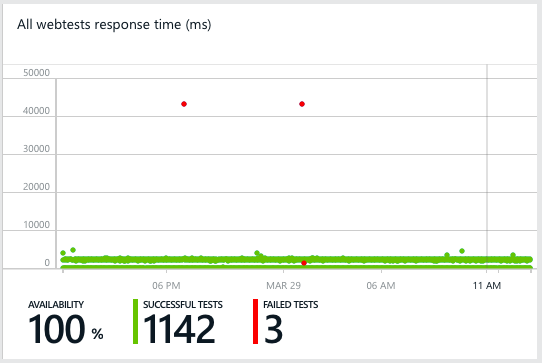
And this is just a simple url ping test to ensure that we get a proper 200 OK response from our EnvokeIT Lab environment that my colleague Björn have setup and modified so nicely with the X1 StoreFront look & feel.


Of course you can make a more proper test than just a url ping test like in this case, the service supports multi-step tests and also content matching etc. It’s also very easy to create one application/service that then consists of multiple locations that you want to monitor, for instance if you’re using GSLB FQDNs as well as regional to ensure that you get the full picture.
More information about what can be done you can find on the Azure Application Insights page. Read more…
#Microsoft #Azure (#IaaS) Cost Estimator Tool version 1.2 released
Have a look at the new version of the Microsoft Azure Cost Estimator Tool, here is a good summary by Courtenay Bernier. It currently only supports US pricing but would give you a good estimate at least and hopefully it’s updated with all other country pricing as well soon!
Back in August of 2014 Microsoft released version 1.0 of the Azure (IaaS) Cost Estimator Tool (view my previous post here). Today I’m happy to announce the release of version 1.2!
The following new features have been updated/added:
- Support for all regions (apart from US) along with associated currencies.
- Support for D-Series virtual machines.
- Export data with new regions and currency symbols.
- Updated instance prices for all regions and currencies.
- Total monthly costs are now calculated over 31 days that’s 744 hours and is aligned with the costs displayed in the Azure portal. (In version 1.0 costs were calculated over 30 days).
Download: http://www.microsoft.com/en-us/download/details.aspx?id=43376

Estimated runtime of 31 days

D-Series VMs Added Read more…
Cloud Platform Integration Framework–Overview – #Microsoft, #IaaS, #PaaS, #CPIF
Another great blog series from Thomas W Shinder – MSFT and contributors!
The Cloud Platform Integration Framework (CPIF) provides workload integration guidance for onboarding applications into a Microsoft Cloud Solution. CPIF describes how organizations, Microsoft Partners and Solution Integrators should design and deploy Cloud-targeted workloads utilizing the hybrid cloud platform and management capabilities of Azure, System Center and Windows Server
Table of Contents
1.1 Cloud Platform Integration Framework (CPIF) Overview
2 Azure Architectural Pattern Concepts
2.1 Overview of Azure Architectural Patterns
Prepared by:
Joel Yoker – Microsoft
David Ziembicki – Microsoft
Tom Shinder – Microsoft
Cloud Platform Integration Framework Overview and Patterns:
Cloud Platform Integration Framework – Overview and Architecture
Modern Datacenter Architecture Patterns-Multi-Site Data Tier
Modern Datacenter Architecture Patterns – Offsite Batch Processing Tier
Modern Datacenter Architecture Patterns-Global Load Balanced Web Tier
Introduction
1.1 Cloud Platform Integration Framework (CPIF) Overview
The Cloud Platform Integration Framework (CPIF) provides workload integration guidance for onboarding applications into a  Microsoft Cloud Solution. CPIF describes how organizations, Microsoft Partners and Solution Integrators should design and deploy Cloud-targeted workloads utilizing the hybrid cloud platform and management capabilities of Azure, System Center and Windows Server. The CPIF domains have been decomposed into the following functions:

Figure 1: Cloud Platform Integration Framework
By integrating these functions directly into workloads….
Continue reading here!
//Richard
Microsoft Infrastructure as a Service Foundations – #IaaS, #Cloud, #PaaS, #Microsoft, #Azure
This series of blog posts by Thomas W Shinder – MSFT and contributors is really great and do cover the best practises and principles behind building Microsoft based private or hybrid IaaS services. Have a look at their great work!
The goal of the Infrastructure-as-a-Service (IaaS) Foundations series is to help enterprise IT departments and cloud service providers understand, develop, and implement IaaS infrastructures. This series provides comprehensive conceptual background that combines Microsoft software, consolidated guidance, and validated configurations with partner technologies such as compute, network, and storage architectures, in addition to value-added software features.
The IaaS Foundations Series utilizes the core capabilities of the Windows Server 2012 R2 operating system, Hyper-V, System Center 2012 R2, Windows Azure Pack and Microsoft Azure to deliver on-premises and hybrid cloud Infrastructure as a Service.
Table of Contents
Chapter 1: Microsoft Infrastructure as a Service Foundations (this article)
Chapter 2: Microsoft Infrastructure as a Service Compute Foundations
Chapter 3: Microsoft Infrastructure as a Service Network Foundations
Chapter 4: Microsoft Infrastructure as a Service Storage Foundations
Chapter 5: Microsoft Infrastructure as a Service Virtualization Platform Foundations
Chapter 6: Microsoft Infrastructure as a Service Design Patterns–Overview
Chapter 7: Microsoft Infrastructure as a Service Foundations—Converged Architecture Pattern
Chapter 8: Microsoft Infrastructure as a Service Foundations-Software Defined Architecture Pattern
Chapter 9: Microsoft Infrastructure as a Service Foundations-Multi-Tenant Designs
Microsoft Infrastructure as a Service Foundations is written and presented in a way that enables architects, designers, implementers and operators to view the content that is most relevant to them. Some readers will choose the read the entire “book”, while others will focus on areas that are most interesting and relevant to them.
At this time, the Microsoft IaaS Foundations “book” is available in web format only. In the coming days, individual files (one for each chapter) and a single file that represents a compilation of all the chapters, will be made available for download. A link to these files will be included in this article, and in each of the articles included in this “book”.
The world of cloud computing moves quickly and the underlying technologies supporting the infrastructure that powers the cloud change and improve just as fast. For this reason, each of the chapters includes a published date and the versions of the software that are discussed in the text. For non-versioned software and services (such as Microsoft Azure), a note of “feature set and capabilities as of…” date is included.
Your feedback is crucial
A lot of time, energy and expense goes…
Continue reading here!
//Richard
Which #DaaS architecture is right? – #Azure, #RemoteApp, #Microsoft, #Citrix, #Workspace
I really feel for you Solution Architects out there that have to struggle with how to revamp your companies or customers Hosted Desktop/App services. They may be provided by a service provider today, or you do it yourself on-premise and manage them, or you’ve already taken the step to purchase it as a true DaaS/SaaS service from a public cloud provider. Today the options are many, and too many if you add all the hosting models and the technology options you have. From a business perspective you’re getting the heat to deliver something with the word “cloud” in it just because it’s hot, and management then expect that TCO is sooooo low and that you have now problems in delivering at all within a couple of weeks and you can scale up and down without any issues at all from a financial or technical perspective… 😉
Often you also don’t even have the business, security, functional or technical requirements either so you’re supposed to come with the magic solution that fits all needs! 😉
My personal view is also that some of our vendors/partners out there don’t seem to have one (1) clear strategy either (at least not officially).
Some are building and providing their own “cloud architecture” models for DaaS for partners to build on (VMware, Citrix, Microsoft etc.), and then they also are providing specific models for certain partners as well that run on top of other cloud solutions, like Citrix Service Provider (CSP) offerings on Azure or on-premise. As a partner to these companies you also are in a tough spot, are you to partner with them and deliver their technology on your infrastructure, or shall you wait until they deliver a fully working public cloud offering (like WorkSpace Services) and then add your added value on top of that? Options are many and I don’t think that Citrix has given their whole story yet, I still think that they business wise need to go where Microsoft is going by providing a DaaS service by themselves directly to customers and thereby also “cut” the partner network out because once the technology and self-service becomes to easy then what shall they add as value then? There will always be customers that wants help to onboard, operate etc. of course but this will be another type of service and many Citrix and Microsoft partners need to be become more solution focused and get away from the SME space and deliver integration and more IT management consulting skill sets instead.
But let’s get back to more technology…
I’ve been kind of waiting to get some time over to test the RemoteApp service in Azure. I personally think that this is the future and they way that many small to medium size business fairly short shall start to look at. Not all of these companies have the skill set or financials to look at building a good Software-as-a-Service (SaaS) offerings of Windows applications internally. I’m a bit annoyed though that out of the box there isn’t any Desktop-as-a-Service (DaaS) offering and that it’s still just the RDS/Hosted Shared Desktop model that is provided. A real Hosted Virtual Desktop or VDI offering would be nice and a license model that goes with it from Microsoft.
There are today so many different options that companies that want to provide or consume a DaaS service can leverage today, Citrix Service Providers have all of their options in terms of technology stacks (CloudStack, CloudPlatform, CSP for Azure, App Orchestration 2.5, Microsoft System Center, Azure Pack and all options that are out there)… but which one shall/can you select? And what if you’re NOT a Citrix service provider and have a huge datacenter and haven’t already done your CAPEX investments around compute, network and storage etc..? Where do you then turn?
I think that here is where RemoteApp and a future Workplace Services offerings with Citrix on top would be great! You as a customer can turn to a partner/consultant company to get guidance and assess all your requirements and then easily be provisioned an environment that is of the “standard cloud offering” or get a customised one tailored specifically for your needs.
Like in my little demo scenario here I provisioned a fully functional RemoteApp environment that hosted all of the Microsoft Office 2013 apps that I use and also got a lot of storage at the same time… in almost no time at all!
Azure RemoteApp helps employees stay productive anywhere, and on a variety of devices – Windows, Mac OS X, iOS, or Android. Your company’s applications run on Windows Server in the Azure cloud, where they’re easier to scale and update. Users can access their applications remotely from their Internet-connected laptop, tablet, or phone. While appearing to run on the users’ local device, the applications are centralized on Azure’s protected, reliable platform.
Azure RemoteApp combines Windows application experiences with the powerful capabilities of Remote Desktop Services on Microsoft Azure – the cloud for modern business.
I also like the licensing model:
- Azure RemoteApp is priced per user and is billed on a monthly basis.
- The service is offered in two tiers: Basic and Standard. Basic is designed for lighter weight applications (e.g. for task workers). Standard is designed for information workers to run productivity applications.
- Pricing: Each service has a starting price per user that includes 40 hours of service per user. Thereafter, a per hour charge is applied for each user hour up to a capped price per user. You will not pay for any additional usage beyond the capped price in a given month.

RDS on Azure example quote:
More Azure solution pricing examples: http://blogs.technet.com/b/uspartner_ts2team/archive/2014/10/14/more-azure-solution-pricing-examples.aspx
What if you then also shall put Citrix on top of that… cost increases of course and still you’re kind of limited of being a SPLA or CSP in order to build this, or you go and ask a SPLA/CSP to provide it for you if you’re an end-customer.
But back *again* to the test-drive that I did of RemoteApp…
Azure ExpressRoute is a really cool and important feature – #Microsoft, #Azure, #ExpressRoute
Everyone talks about the “cloud” and how you can leverage all the benefits or a public, private or hybrid cloud model. And one challenge and huge risks that enterprises see with moving into a public cloud like Azure is the dependency to the public Internet.
Is the connection secure, stable, available and how can you determine that I have the connectivity between my on-premise stuff and Azure..?
It’s here where I think that Microsoft really has made a HUGE step towards getting more traction with the larger enterprises with the new ExpressRoute feature! Now you can get your own dedicated connection to Azure through it’s partner network of service providers like AT&T and Verizon etc.!

Microsoft Azure ExpressRoute lets you create private connections between Azure datacenters and infrastructure that’s on your premises or in a co-location environment. With ExpressRoute, you can establish connections to Azure at an ExpressRoute partner co-location facility or directly connect to Azure from your existing WAN network (such as a MPLS VPN provided by a Network Service Provider). Read more…
Almost perfect.. #ShareFile StorageZones on Azure is now generally available! – #Citrix, #Azure
This is a great addition I must say, but some things are missing!
One thing that I’m missing is the full integration with Azure storage containers! You still have to specify a temp/cache storage location that today ShareFile controller requires to be on a CIFS share when you have multiple controllers. And if you put the controller up in Azure as well, how do you then get that CIFS share and make it highly available? There is no CIFS exposure directly from the Azure storage, you have to setup a couple of VM’s in Azure, do something like DFS to expose is.. and then all of a sudden you have a whole file service to manage there as well.. and to monitor and all of a sudden you need AD and monitoring and reporting of it.. phuuu…
So I hope that in next version we can specify an Azure storage container for that cache/temp storage as well! 😉
The other thing I’d really like to see is NetScaler support in Azure, so that we could do proper AAA/CS/LB of the controllers in Azure as well so that we can get a simple and fully cloud based service in Azure! 🙂
BYOD and a growing global workforce are generating demand for instant access to data, offline productivity and seamless collaboration from anywhere. Organizations are challenged with reconciling these forces with leveraging existing investments, protect intellectual property and meet regulatory compliance requirements – driving interest in ShareFile StorageZones. StorageZones offers IT the flexibility to store data in secure Citrix-managed datacenters in multiple worldwide locations, or on-premise within their own datacenters.
At Citrix Synergy 2013, we announced new ShareFile StorageZones options with Microsoft Windows Azure. We are now pleased to announce the general availability of ShareFile StorageZones on Azure with the release of ShareFile StorageZones Controller software version 2.2. This release includes support for Windows Azure storage containers, therefore if you have a Windows Azure account, you can use an Azure storage container for your private data storage instead of a locally maintained share. Hosting ShareFile data natively in your Microsoft Azure account helps IT build the most cost-effective and customized solution for their organization. This customer-managed solution integrates ShareFile with Microsoft Azure’s Binary Large Object (Blob) storage, a cloud service for storing large amounts of unstructured data that can be accessed from anywhere in the world via HTTP or HTTPS.
Product Overview
Azure storage is customer-managed storage hosted in the Windows Azure cloud. File uploads are initially deposited into a temporary storage area shared by all StorageZone controllers. Then, a background service copies those files to the Windows Azure storage container and deletes the local cached copy of the file(s).

Typically with CIFS based StorageZones, the Controller servers are installed on-premise in the customer’s datacenter. However, if a customer is hosting virtual machines in Azure, they could install the StorageZone Controller software on instances running in their Azure account and not necessarily on-premise.
Read the ShareFile StorageZones on Azure Storage Technical Brief and watch the video Installing and Configuring ShareFile StorageZones v2.2 with Microsoft Azure to learn more about this solution.
Check out our Citrix and…
Continue reading here!
//Richard
#Windows #Azure Desktop Hosting Deployment Guide – #RDS, #BYOD – via @michael_keen
This is great! Have a look at this guide!
Hello everyone, this is Clark Nicholson from the Remote Desktop Virtualization Team. I’m writing today to let you know that we have just published the Windows Azure Desktop Hosting Deployment Guide. This document provides guidance for deploying a basic desktop hosting solution based on the Windows Azure Desktop Hosting Reference Architecture Guide. This document is intended to provide a starting point for implementing a Desktop Hosting service on Windows Azure virtual machines. A production environment will need additional deployment steps to provide advanced features such as high availability, customized desktop experience, RemoteApp collections, etc.
For more information, please see Remote Desktop Services and Windows Azure Infrastructure Services.
Continue reading here!
//Richard
#Microsoft Desktop Hosting Reference Architecture Guides
Wow, these are some compelling guides that Microsoft delivered!! Have a look at them! But of course there’s always something more U want! Let Service Providers provide DaaS services based on client OS’s as well!!!
 |
Microsoft has released two papers related to Desktop Hosting. The first is called: “Desktop Hosting Reference Architecture Guide” and the second is called: “Windows Azure Desktop Hosting Reference Architecture Guide“. Both documents provide a blueprint for creating secure, scalable, multi-tenant desktop hosting solutions using Windows Server 2012 and System Center 2012 SP1 Virtual Machine Manager or using Windows Azure Infrastructure Services.
The documents are targeted to hosting providers which deliver desktop hosting via the Microsoft Service Provider Licensing Agreement (SPLA). Desktop hosting in this case is based on Windows Server with the Windows Desktop Experience feature enabled, and not Microsoft’s client Operating Systems like Windows 7 or Windows 8.
For some reason, Microsoft still doesn’t want service providers to provide Desktops as a Service (DaaS) running on top of a Microsoft Client OS, as outlined in the “Decoding Microsoft’s VDI Licensing Arcanum” paper which virtualization.info covered in September this year.
The Desktop Hosting Reference Architecture Guide provides the following sections:
- Desktop Hosting Service Logical Architecture
- Service Layer
- Tenant Environment
- Provider Management and Perimeter Environments
- Virtualization Layer
- Hyper-V and Virtual Machine Manager
- Scale-Out File Server
- Physical Layer
- Servers
- Network
- Tenant On-Premises Components
- Clients
- Active Directory Domain Services

The Windows Azure Desktop Hosting Reference Architecture covers the following topics:




 The IT Melting Pot!