Archive
Sizing #XenDesktop 7 App Edition VMs – #Citrix
A good update on VM sizing by Daniel Feller!
In the Mobilizing Windows applications for 500 users design guide, we made the recommendation to allocate 8vCPUs for each virtual XenDesktop 7 App Edition host (formerly known as XenApp). Spreading this out across a server with two Intel Xeon E5-2690 @2.9GHz processors and 192 GB of RAM, we were yielding about 200 users per physical server and roughly 50 users per virtual server.
Of course, the design guide is the end result of a lot of testing by the Citrix Solutions Lab. During the tests, we had the Solutions Lab compare many (and I mean many) different configurations where they changed the number of vCPU, RAM size, and RAM allocation (dynamic/static) as well as a few other things. All of these tests were done with Windows Server 2012 with Hyper-V. We ended up with the following:

A few interesting things:
- Dynamic vs static RAM in Hyper-V appeared to have little, if any, impact on overall scalability. The only time when the RAM allocation had a negative impact was when not enough RAM was allocated (no surprise there).
- The 8vCPU and the 4vCPU configurations resulted in very similar user concurrency levels. Get ready… The battle is about to begin as to whether we should use 8 or 4 vCPU. (Is anyone else besides me having flashbacks to 2009?)
A few years ago, we debated about using 2vCPU or 4vCPU for XenApp 5 virtual machines. A few years later, the debate is resurfacing but this time, the numbers have doubled: 4 or 8. Here is what you should be thinking about… VMs are getting bigger because the hardware is getting faster, RAM is getting cheaper and the hypervisors are getting better…
Continue reading here!
//Richard
#XenDesktop 7.1 Service Template Tech Preview for System Center 2012 Virtual Machine Manager – #SCVMM
This is interesting! Really good and can’t wait to try it out!
Introduction
Let’s face it, installing distributed, enterprise-class virtual desktop and server based computing infrastructure is time consuming and complex. The infrastructure consists of many components that are installed on individual servers and then configured to work together. Traditionally this has largely been a manual, error prone process.
The Citrix XenDesktop 7.1 Service Template for System Center 2012 Virtual Machine Manager (SCVMM) leverages the rich automation capabilities available in Microsoft’s private cloud offering to significantly streamline and simplify the installation experience. The XenDesktop 7.1 Service Template enables rapid deployment of virtual app and desktop infrastructure on Microsoft System Center 2012 private clouds. This Tech Preview is available now and includes the latest 7.1 version of XenDesktop that supports Windows Server 2012 R2 and System Center 2012 R2 Virtual Machine Manager.
Key Benefits:
- Rapid Deployment – A fully configured XenDesktop 7.1 deployment that adheres to Citrix best practices is automatically installed in about an hour; a manual installation can take a day or more.
- Reduction of human errors and the unwanted consequences – IT administrators answer 9 questions about the XenDesktop deployment, including the VM Network to use, the domain to join, the SQL server used to host the database, the SCVMM server to host the desktops, and the administrative service accounts to connect to each of these resources. Once this information is entered, the Service Template automation installs the XenDesktop infrastructure the same way, every time, ensuring consistency and correctness.
- Reduction in cost of IT Operations – XenDesktop infrastructure consistently configured with automation is less costly to support because the configuration adheres to best practice standards.
- Free highly skilled and knowledgeable staff from repeatable and mundane tasks – A Citrix administrator’s time is better spent focused on ensuring that users get access to the applications they need, rather than lengthy production installation tasks.
- Simplified Eval to Retail Conversion – Windows Server 2012 and later, as well as XenDesktop 7.1, support conversion of evaluation product keys to retail keys. This means that a successful POC deployment of the XenDesktop 7.1 Service Template is easily converted to a fully supported and properly configured production deployment.
- Easy Scale-Out for greater capacity – SCVMM Service Templates support a scale-out model to increase user capacity. For example, as user demand increases additional XenDesktop Controllers and StoreFront servers are easily added with a few clicks and are automatically joined to the XenDesktop site.
The XenDesktop Service Templates were developed and tested with the support of our friends and partners at Dell, who, in support of the release of XenDesktop 7.1 and the Service Template technical preview, are expected to launch new and innovative solutions that include these and other automation capabilities this quarter. These solutions are based on the Dell DVS Enterprise for Citrix XenDesktop solutions.
Simplification of Distributed Deployments
The XenDesktop 7.1 in-box installation wizard is a fantastic user experience that automatically installs all the required prerequisites and XenDesktop components in under 30 minutes. The result is a fully installed XenDesktop deployment, all on a single server, that is excellent for POCs and product evaluations. The installation and configuration challenges occur when you want to install XenDesktop in production, with enterprise-class scalability, distributed across multiple servers.
Manual Installation Steps

#Rackspace launches high performance cloud servers – #IaaS via @ldignan
Rackspace on Tuesday rolled out new high performance cloud servers with all solid-state storage, more memory and the latest Intel processors.
The company aims to take its high performance cloud servers and pitch them to companies focused on big data workloads. Rackspace’s performance cloud servers are available immediately in the company’s Northern Virginia region and will come online in Dallas, Chicago and London this month. Sydney and Hong Kong regions will launch in the first half of 2014.
Among the key features:
- The public cloud servers have RAID 10-protected solid state drives;
- Intel Xeon E5 processors;
- Up to 120 Gigabytes of RAM;
- 40 Gigabits per second of network throughput.
Overall, the public cloud servers, which run on OpenStack, provide a healthy performance boost of Rackspace’s previous offering. The performance cloud servers are optimized for Rackspace’s cloud block storage.
Rackspace said it will offer the performance cloud servers as part of a hybrid data center package.
Continue reading here!
//Richard
Making #OpenStack Grizzly Deployments Less Hairy – #Puppet, #PuppetLabs
Today, I’m excited to announce a new module from Puppet Labs for OpenStack Grizzly. I’ve been working on this module with the goal of demonstrating how to simplify OpenStack deployments by identifying their independent components and customizing them for your environment.
The puppetlabs-grizzly module is a multi-node deployment of OpenStack built on the puppetlabs-openstack modules. There are two core differences in how it handles deploying OpenStack resources. First, it uses a “roles and profiles” model. Roles allow you to identify a node’s function, and profiles are the components that describe that role. For example, a typical controller node is composed of messaging, database and API profiles. Roles and profiles allow you to clearly define what a node does with a role, while being flexible enough to mix profiles to compose new roles.
The second difference is that the module leverages Hiera, a database that allows you to store configuration settings in a hierarchy of text files. Hiera can use Facter facts about a given node to set values for module parameters, rather than storing those values in the module itself. If you have to change a network setting or password, Hiera allows you to change it in your Hiera text file hierarchy, rather than changing it in the module.
Check out parts 1 and 2 of the demo, which walks you through how to deploy OpenStack with the puppetlabs-grizzly module.
Multi-node OpenStack Grizzly with Puppet Enterprise: Deployment (Part 1 of 2)
Hyperscale Invades the Enterprise and the Impact on Converged Infrastructure – via @mathiastornblom
This is really interesting! Look at this video!
In this whiteboard presentation, Wikibon Senior Analyst Stu Miniman shares how enterprise IT can learn from the architectural models of hyperscale companies. He walks through Wikibon’s definition of software-led infrastructure and how converged infrastructure solutions meet the market’s requirements.
Continue reading or watch the whole channel here!
//Richard
Citrix Project Accelerator updated – #XenDesktop
“Customize My Design”, the Design release of Project Accelerator is here! We listened to your feedback and have delivered the ability to change FlexCast, application delivery, profiles and over 30 other decisions for your XenDesktop architecture. Across these decisions you will now be able to:
- Tailor your design to fit organizational and end user needs
- Visualize how your design “tweaks” affect hardware sizing and architecture
- On-the-fly comparison of Citrix Recommendations to your design decisions
- Review “Architect Comments”, guidance from the Citrix experts for each Decision
“Customize my Design” is the next step for Project Accelerator; the application that simplifies getting your XenDesktop, XenApp, or XenClient deployment done successfully the first time. It’s the Citrix environment where customers, partners, and Citrites can design a desktop virtualization project that more closely suits their business priorities, end user needs, and organizational preferences. And it is back-stopped by the real-world experience of Citrix Consulting, so you can use the results in your project.
Check it out right now or read more about what Project Accelerator can do for you here. Then tell us what you like, and let us…
Continue reading here!
//Richard
#Microsoft Desktop Hosting Reference Architecture Guides
Wow, these are some compelling guides that Microsoft delivered!! Have a look at them! But of course there’s always something more U want! Let Service Providers provide DaaS services based on client OS’s as well!!!
 |
Microsoft has released two papers related to Desktop Hosting. The first is called: “Desktop Hosting Reference Architecture Guide” and the second is called: “Windows Azure Desktop Hosting Reference Architecture Guide“. Both documents provide a blueprint for creating secure, scalable, multi-tenant desktop hosting solutions using Windows Server 2012 and System Center 2012 SP1 Virtual Machine Manager or using Windows Azure Infrastructure Services.
The documents are targeted to hosting providers which deliver desktop hosting via the Microsoft Service Provider Licensing Agreement (SPLA). Desktop hosting in this case is based on Windows Server with the Windows Desktop Experience feature enabled, and not Microsoft’s client Operating Systems like Windows 7 or Windows 8.
For some reason, Microsoft still doesn’t want service providers to provide Desktops as a Service (DaaS) running on top of a Microsoft Client OS, as outlined in the “Decoding Microsoft’s VDI Licensing Arcanum” paper which virtualization.info covered in September this year.
The Desktop Hosting Reference Architecture Guide provides the following sections:
- Desktop Hosting Service Logical Architecture
- Service Layer
- Tenant Environment
- Provider Management and Perimeter Environments
- Virtualization Layer
- Hyper-V and Virtual Machine Manager
- Scale-Out File Server
- Physical Layer
- Servers
- Network
- Tenant On-Premises Components
- Clients
- Active Directory Domain Services

The Windows Azure Desktop Hosting Reference Architecture covers the following topics:
Manage #Linux based clients in #SCCM 2012 R2 – via @ncbrady
Another great post from Niall C. Brady, keep up the great job!
Wouldn’t it be great to have a complete solution from Microsoft that handles all the configuration capabilities of most enterprise OS’s like Windows, Linux distributions as well as Mac OS X? Microsoft are at least doing a great job working towards a more complete offering!
Introduction
System Center 2012 R2 Configuration Manager supports a wide variety of operating systems including alternative operating systems such as the following:-
Mac Client:
- Mac OS X 10.6 (Snow Leopard)
- Mac OS X 10.7 (Lion)
- Mac OS X 10.8 (Mountain Lion)
UNIX/Linux Client:
- AIX Version 7.1, 6.1, 5.3
- Solaris Version 11, 10, 9
- HP-UX Version 11iv2 , 11iv3
- RHEL Version 6 , 5, 4
- SLES Version 11, 10, 9
- CentOS Version 6, 5
- Debian Version 6, 5
- Ubuntu Version 12.4 LTS, 10.4 LTS
- Oracle Linux 6, 5
In this post I will show you how to install the Linux client on a popular Linux operating system (Centos 6.4) and do some basic actions like hardware and software inventory in System Center 2012 R2 Configuration Manager. This guide assumes you have already installed your Linux server and are ready for the next step. If you have not installed it yet just download the Live CD from here and boot from it, choose the option to Install to hard drive once the os has booted to the desktop.
Step 1. Download the Alternative Client files
When you started the System Center 2012 R2 Configuration Manager installation you probably didn’t notice that there was a link to download alternative clients on the splash screen highlighted in the screenshot below
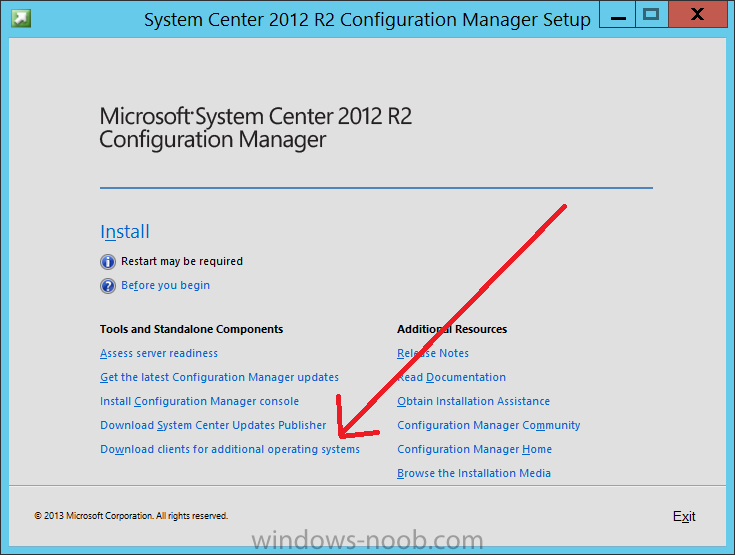
If you did click on the link it would bring you here so go ahead and download those client files.
Step 2. Extract the Linux client files on a Windows computer
On the computer you downloaded the alternative client files, locate the Linux client exe file and extract the contents somewhere local by double clicking on the ConfigMgr Clients for Linux.exe file.
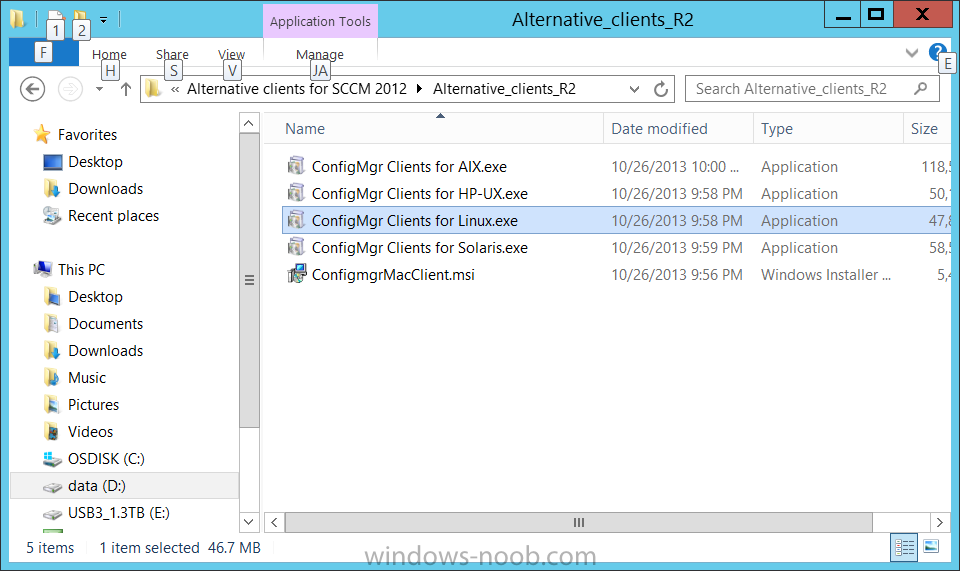
extract the files to…
Continue reading here!
//Richard
#Microsoft launches its #Azure #Hadoop service! – via @maryjofoley
This is really cool!
Microsoft’s cloud-based distribution of Hadoop — which it has been developing for the past year-plus with Hortonworks — is generally available as of October 28.
Microsoft officials also are acknowledging publicly that Microsoft has dropped plans to deliver a Microsoft-Hortonworks developed implementation of Windows Server, which was known as HDInsight Server for Windows. Instead, Microsoft will be advising customers who want Hadoop on Windows Server to go with Hortonworks Data Platform (HDP) for Windows.
Windows Azure HDInsight is “100 percent Apache Hadoop” and builds on top of HDP. HDInsight includes full compatibility with Apache Hadoop, as well as integration with Microsoft’s own business-intelligence tools, such as Excel, SQL Server and PowerBI.
“Our vision is how do we bring big data to a billion people,” said Eron Kelly, Microsoft’s SQL Server General Manager. “We want to make the data and insights accessible to everyone.”
Making the Hadoop big-data framework available in the cloud, so that users can spin up and spin down Hadoop clusters when needed is one way Microsoft intends to meet this goal, Kelly said.
Microsoft and Hortonworks originally announced plans to bring the Hadoop big-data framework to Windows Server and Windows Azure in the fall of 2011. Microsoft made a first public preview of its Hadoop on Windows Server product (known officially as HDInsight Server for Windows) available in October 2012.
Microsoft made available its first public preview of its Hadoop on Windows Azure service, known as HDInsight Service, on March 18. Before that…
Continue reading here!
//Richard
Performance tuning #Citrix #Storefront – via @msandbu
Great article by Marius!
Read it and also have a look here at my previous post related to this: #Citrix #StoreFront Slowness, Join and Replication issue – check list!
This is something I wanted to write about for some time now, after the release of XenDesktop 7 but there are only 24 hours in one day so therefore I didn’t have the time before now 
But the purpose of this post is to really say that Storefront is slow…..
Don’t get me wrong it not about Citrix but the combination of Storefront and IIS that makes it a bit complex and therefore this makes it a bit slow.
Now there are a couple of tricks that can tune the perfomance.
Socket Pooling
In Web Interface you could enable it from the console, but in StoreFront we have to change it in the store config. By enabling socket pooling, Storefront maintaines a pool of sockets instead of creating a socket each time a new user connects, this will give a better performance for SSL based traffic.
You can enable this by opening the web.config file under C:\inetpub\wwwroot\Citrix\storename\
pooledSockets="off"
And Change this to “on” after that you have to do an IIS reset.
Application Initialization
(NOTE: Make sure you backup the config files before making alterations)
With Windows Server 2012 we have a new feature in IIS called always running on the application pools, this allowed for IIS to make everything ready after an application pool has restarted, before this the previous IIS was set to start loading after the first user tried to login after a restart. This caused the first user to login after an application pool has restarted to take loooong time to login. With Server 2012 IIS we can change the application pool to always running.
With 2008 R2 not so easy. But we can make it happen
First we need to download the application initialization feature from Microsoft
http://www.iis.net/downloads/microsoft/application-initialization
After that is done and installed…
Continue reading here!
//Richard




 The IT Melting Pot!