Archive
There was a big flash, and then the dinosaurs died – via @binnygill, #Nutanix
Great blog post by @binnygill! 😉
This is how it was supposed to end. The legacy SAN and NAS vendors finally realize that Flash is fundamentally different from HDDs. Even after a decade of efforts to completely assimilate Flash into the legacy architectures of the SAN/NAS era, it’s now clear that new architectures are required to support Flash arrays. The excitement around all-flash arrays is a testament to how different Flash is from HDDs, and its ultimate importance to datacenters.
Consider what happened in the datacenter two decades ago: HDDs were moved out of networked computers, and SAN and NAS were born. What is more interesting, however, is what was not relocated.
Although it was feasible to move DRAM out with technology similar to RDMA, it did not make sense. Why move a low latency, high throughput component across a networking fabric, which would inevitably become a bottleneck?
Today Flash is forcing datacenter architects to revisit this same decision. Fast near-DRAM-speed storage is a reality today. SAN and NAS vendors have attempted to provide that same goodness in the legacy architectures, but have failed. The last ditch effort is to create special-purpose architectures that bundle flash into arrays, and connect it to a bunch of servers. If that is really a good idea, then why don’t we also pool DRAM in that fashion and share with all servers? This last stand will be a very short lived one. What is becoming increasingly apparent is that Flash belongs on the server – just like DRAM.
For example, consider a single Fusion-IO flash card that writes at 2.5GB/s throughput and supports 1,100,000 IOPS with just 15 microsec latency (http://www.fusionio.com/products/iodrive2-duo/). You can realize these speeds by attaching the card to your server and throwing your workload at it. If you put 10 of these cards in a 2U-3U storage controller, should you expect 25GB/s streaming writes, and 11 million IOPS at sub millisecond latencies. To my knowledge no storage controller can do that today, and for good reasons.
Networked storage has the overhead of networking protocols. Protocols like NFS and iSCSI are not designed for massive parallelism, and end up creating bottlenecks that make crossing a few million IOPS on a single datastore an extremely hard computer science problem. Further, if an all-flash array is servicing ten servers, then the networking prowess of the all-flash array should be 10X of that of each server, or else we end up artificially limiting the bandwidth that each server can get based on how the storage array is shared.
No networking technology, whether it be Infiniband, Ethernet, or fibre channel can beat the price and performance of locally-attached PCIe, or even that of a locally-attached SATA controller. Placing flash devices that operate at almost DRAM speeds outside of the server requires unnecessary investment in high-end networking. Eventually, as flash becomes faster, the cost of a speed-matched network will become unbearable, and the datacenter will gravitate towards locally-attached flash – both for technological reasons, as well as for sustainable economics.
The right way to utilize flash is to treat it as one would treat DRAM — place it on the server where it belongs. The charts below illustrate the dramatic speed up from server-attached flash.

Continue reading here!
//Richard
#Windows server 2012 Storage Spaces – using PowerShell – via LazyWinAdmin
Very good work on this blog post about Windows Storage Spaces!
WS2012 Storage – Creating a Storage Pool and a Storage Space (aka Virtual Disk) using PowerShell

In my previous posts I talked about how to use NFS and iSCSI technologies hosted on Windows Server 2012 and how to deploy those to my Home Lab ESXi servers.
- WS2012 Storage – iSCSI Target Server – Create an iSCSI target using PowerShell
- WS2012 Storage – iSCSI Target Server – Configuring an iSCSI Initiator on VMware vSphere 5.1
- WS2012 Storage – NFS Server – Configure NFS for VMware vSphere 5.1
One point I did not covered was: How to do the Initial setup with the physical disk, Storage pooling and the creating the Virtual Disk(s) ?
The cost to acquire and manage highly available and reliable storage can represent a significant part of the IT budget. Windows Server 2012 addresses this issue by delivering a sophisticated virtualized storage feature called Storage Spaces as part of the WS2012 Storage platform. This provides an alternative option for companies that require advanced storage capabilities at lower price point.
Overview
- Terminology
- Storage Virtualization Concept
- Deployment Model of a Storage Space
- Quick look at Storage Management under Windows Server 2012Identifying the physical disk(s)
- Server Manager – Volumes
- PowerShell – Module Storage
- Creating the Storage Pool
- Creating the Virtual Disk
- Initializing the Virtual Disk
- Partitioning and Formating
Terminology
Storage Pool: Abstraction of multiple physical disks into a logical construct with specified capacity
Group of physical disks into a container, the so-called storage pool, such that the total capacity collectively presented by those associated physical disks can appear and become manageable as a single and seemingly continuous space.
There are two primary types of pools which are used in conjunction with Storage Spaces, as well as the management API in Windows Server 2012: Primordial Pool and Concrete Pool.
Primordial Pool: The Primordial pool represents all of the disks that Storage Spaces is able to enumerate, regardless of whether they are currently being used for a concrete pool. Physical Disks in the Primordial pool have a property named CanPool equal to “True” when they meet the requirements to create a concrete pool.
Concrete Pool: A Concrete pool is a specific collection of Physical Disks that was formed by the user to allow creating Storage Spaces (aka Virtual Disks).
#Rackspace launches high performance cloud servers – #IaaS via @ldignan
Rackspace on Tuesday rolled out new high performance cloud servers with all solid-state storage, more memory and the latest Intel processors.
The company aims to take its high performance cloud servers and pitch them to companies focused on big data workloads. Rackspace’s performance cloud servers are available immediately in the company’s Northern Virginia region and will come online in Dallas, Chicago and London this month. Sydney and Hong Kong regions will launch in the first half of 2014.
Among the key features:
- The public cloud servers have RAID 10-protected solid state drives;
- Intel Xeon E5 processors;
- Up to 120 Gigabytes of RAM;
- 40 Gigabits per second of network throughput.
Overall, the public cloud servers, which run on OpenStack, provide a healthy performance boost of Rackspace’s previous offering. The performance cloud servers are optimized for Rackspace’s cloud block storage.
Rackspace said it will offer the performance cloud servers as part of a hybrid data center package.
Continue reading here!
//Richard
Hyperscale Invades the Enterprise and the Impact on Converged Infrastructure – via @mathiastornblom
This is really interesting! Look at this video!
In this whiteboard presentation, Wikibon Senior Analyst Stu Miniman shares how enterprise IT can learn from the architectural models of hyperscale companies. He walks through Wikibon’s definition of software-led infrastructure and how converged infrastructure solutions meet the market’s requirements.
Continue reading or watch the whole channel here!
//Richard
True Scale Out Shared Nothing Architecture – #Compute, #Storage, #Nutanix via @josh_odgers
This is yet another great blog post by Josh! Great work and keep it up! 😉
I love this statement:
I think this really highlights what VMware and players like Google, Facebook & Twitter have been saying for a long time, scaling out not up, and shared nothing architecture is the way of the future.
At VMware vForum Sydney this week I presented “Taking vSphere to the next level with converged infrastructure”.
Firstly, I wanted to thank everyone who attended the session, it was a great turnout and during the Q&A there were a ton of great questions.
I got a lot of feedback at the session and when meeting people at vForum about how the Nutanix scale out shared nothing architecture tolerates failures.
I thought I would summarize this capability as I believe its quite impressive and should put everyone’s mind at ease when moving to this kind of architecture.
So lets take a look at a 5 node Nutanix cluster, and for this example, we have one running VM. The VM has all its data locally, represented by the “A” , “B” and “C” and this data is also distributed across the Nutanix cluster to provide data protection / resiliency etc.

So, what happens when an ESXi host failure, which results in the Nutanix Controller VM (CVM) going offline and the storage which is locally connected to the Nutanix CVM being unavailable?
Firstly, VMware HA restarts the VM onto another ESXi host in the vSphere Cluster and it runs as normal, accessing data both locally where it is available (in this case, the “A” data is local) and remotely (if required) to get data “B” and “C”.

Secondly, when data which is not local (in this example “B” and “C”) is accessed via other Nutanix CVMs in the cluster, it will be “localized” onto the host where the VM resides for faster future access.
It is importaint to note, if data which is not local is not accessed by the VM, it will remain remote, as there is no benefit in relocating it and this reduces the workload on the network and cluster.
The end result is the VM restarts the same as it would using traditional storage, then the Nutanix cluster “curator” detects if any data only has one copy, and replicates the required data throughout the cluster to ensure full resiliency.
The cluster will then look like a fully functioning 4 node cluster as show below.

The process of repairing the cluster from a failure is commonly incorrectly compared to a RAID pack rebuild. With a raid rebuild, a small number of disks, say 8, are under heavy load re striping data across a hot spare or a replacement drive. During this time the performance of everything on the RAID pack is significantly impacted.
With Nutanix, the data is distributed across the entire cluster, which even with a 5 node cluster will be at least 20 SATA drives, but with all data being written to SSD then sequentially offloaded to SATA.
The impact of this process is much less than a RAID…
Continue reading here!
//Richard
Solving the Compute and Storage scalability dilemma – #Nutanix, via @josh_odgers
The topic of Compute, Network and STORAGE is a hot topic as I’ve written in blog posts before this one (How to pick virtualization (HW, NW, Storage) solution for your #VDI environment? – #Nutanix, @StevenPoitras) … and still a lot of colleagues and customers are struggling with finding better solutions and architecture.
How can we ensure that we get the same or better performance of our new architecture? How can we scale in a more simple and linear manner? How can we ensure that we don’t have a single point of failure for all of our VM’s etc..? How are others scaling and doing this in a better way?
I’m not a storage expert, but I do know and read that many companies out there are working on finding the optimal solution for Compute and Storage, and how they can get the cost down and be left with a more simple architecture to manage…
This is a topic that most need to address as well now when more and more organisations are starting to build their private clouds, because how are you going to scale it and how can you get closer to the delivery that the big players provide? Gartner even had Software-Defined-Storage (SDS) as the number 2 trend going forward: #Gartner Outlines 10 IT Trends To Watch – via @MichealRoth, #Nutanix, #VMWare
Right now I see Nutanix as the leader here! They rock! Just have a look at this linear scalability:
If you want to learn more how Nutanix can bring great value please contact us at EnvokeIT!
For an intro of Nutanix in 2 minutes have a look at these videos:
Overview:
#Gartner Outlines 10 IT Trends To Watch – via @MichealRoth, #Nutanix, #VMWare
This is also a good analysis I must say, I think that they are spot on! Even though I think that most companies haven’t addressed the whole Mobility aspect of going away from “managing devices” yet, there are a lot of “BYOD” strategies and solutions that companies still need to work on….
And of course I see a great opportunity to transform and build new “cloud” services/datacenters as well and do it in a more up-to-date, agile, scalable and simple way than what we’ve done over all these years. Stop building the old legacy architecture of Compure, Network and Storage and see what the market leaders of IaaS and PaaS are doing. One of the great players here is of course Nutanix as I see it (contact EnvokeIT if you need more info about this great product)!
Gartner Inc. offered a glimpse of 10 trends for IT professionals to pay attention to over the next five years.
The trends were discussed in a Thursday Webinar by David J. Cappuccio, a research vice president at Gartner. He noted that IT pros are busy enough with daily operations, with “74 percent” of IT budgets devoted to those concerns. Still, he contended that there are lots of new technologies and trends that will have an impact on IT departments.
Gartner expects these trends will affect IT over the next five years:
- “Software-defined networks
- “Software-defined storage
- “Hybrid cloud services
- “Integrated systems
- “Applications acceleration
- “The Internet of things
- “Open Compute Project
- “Intelligent datacenters
- “IT demand
- “Organizational entrenchment and disruptions”
End user expectations are affecting IT. New workers getting out of college are expecting access to everything all of the time, from any device, from anywhere, Cappuccio said. They typically own between three and four devices today, he added.
Software-defined networking (SDN) came into general awareness about two years ago, expecially after SDN pioneer Nicira came out of stealth mode, Cappuccio said. Nicira’s idea was to create a software stack that would manage the real-world physical network. The concept resonated well with the marketplace, and Nicira was bought by VMware in a $1.4 billion purchase. SDN represents a new way to operate networks, which can be configured…
Continue reading here!
//Richard
How to pick virtualization (HW, NW, Storage) solution for your #VDI environment? – #Nutanix, @StevenPoitras
Here we are again… a lot of companies and Solution Architects are scratching their heads thinking about how we’re going to do it “this time”.
Most of you out there have something today, probably running XenApp on your VMware or XenServer hypervisor with a FC SAN or something, perhaps provisioned using PVS or just managed individually. There is also most likely a “problem” with talking to the Storage team that manage the storage service for the IaaS service that isn’t built for the type of workloads that XenApp and XenDesktop (VDI) requires.
So how are you going to do it this time? Are you going to challenge the Storage and Server/IaaS service and be innovative and review the new cooler products and capabilities that now exists out there? They are totally changing the way that we build Virtual Cloud Computing solutions where; business agility, simplicity, cost savings, performance and simple scale out is important!
There is no one solution for everything… but I’m getting more and more impressed by some of the “new” players on the market when it comes to providing simple and yet so powerful and performing Virtual Cloud Computing products. One in particular is Nutanix that EnvokeIT has partnered with and they have a truly stunning product.
But as many have written in many great blog posts about choosing your storage solution for your VDI solution you truly need to understand what your service will require from the underlying dependency services. And is it really worth to do it the old way? You have your team that manages the IaaS service, and most of the times it just provides a way for ordering/provisioning VM’s, then the “VDI” team leverages that one using PVS or MCS. Some companies are not even where they can order that VM as a service or provision it from the Image Provisioning (PVS/MCS) service, everything is manual and they call it a IaaS service… is it then a real IaaS service? My answer would be now… but let’s get back to the point I was trying to make!
This HW, Hypervisor, Network, Storage (and sometimes orchestrator) components are often managed by different teams. Each team are also most of the times not really up to date in terms of understanding what a Virtualization/VDI service will require from them and their components. They are very competent in understanding the traditional workload of running a web server VM or similar, but not really dealing with boot storms from hundreds to thousands of VDI’s booting up, people logging in at the same time and the whole pattern of IOPS that is generated in these VM’s “life-cycle”.
This is where I’d suggest everyone to challenge their traditional view on building Virtualization and Storage services for running Hosted Shared Desktop (XenApp/RDS) and Hosted Virtual Desktop (VDI/XenDesktop) on!
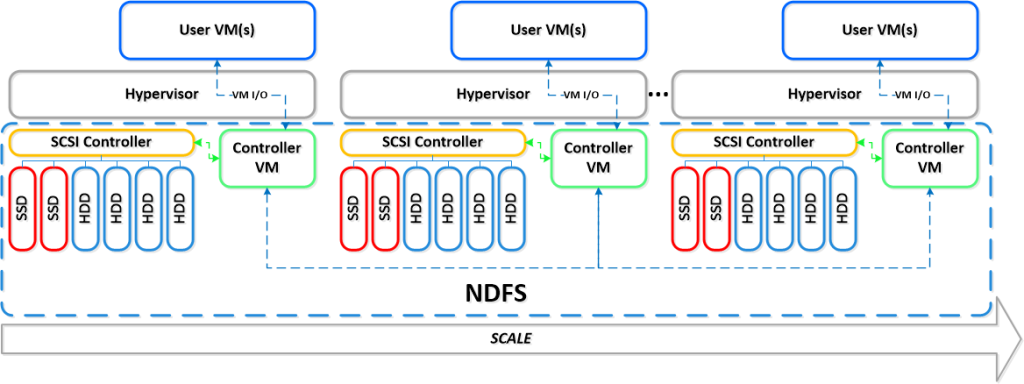
You can reduce the complexity, reduce your operational costs and integrate Nutanix as a real power compute part of your internal/private cloud service!
One thing that also is kind of cool is the integration possibilities of the Nutanix product with OpenStack and other cloud management products through its REST API’s. And it supports running both Hyper-V, VMware ESXi and KVM as hypervisors in this lovely bundled product.
If you want the nitty gritty details about this product I highly recommend that you read the Nutanix Bible post by Steven Poitras here.

Organizational Challenges with #VDI – #Citrix
And yet another good blog post by Citrix and Wayne Baker. This is an interesting topic and I must say that the blog posts still goes into a lot of the technical aspects, but there are more “soft” organisational aspects to look into as well like service delivery/governance model and process changes that often are missed. And as Wayne also highlights below and that’s worth mentioning again is the impact on the network that also was covered well in this previous post: #Citrix blog post – Get Up To Speed On #XenDesktop Bandwidth Requirements
Back to the post itself:
One of the biggest challenges I repeatedly come across when working with large customers attempting desktop transformation projects, is the internal structure of the organisation. I don’t mean that the organisation itself is a problem, rather that the project they are attempting spans so many areas of responsibility it can cause significant friction. Many of these customers undertake the projects as a purely technical exercise, but I’m here to tell you it’s also an exercise in organisational change!
One of the things I see most often is a “Desktop” team consisting of all the people who traditionally manage all the end-points, and a totally disparate “Server” team who handle all the server virtualization and back-end work. There’s also the “Networks” team to worry about and often the “Storage” team are in the mix too! Bridging those gaps can be one of the areas where friction begins to show. In my role I tend to be involved across all the teams, and having discussion with all of those people alerts me to where weaknesses may lie in the project. For example the requirements for server virtualization tend to be significantly different to the requirements for desktop virtualization, but when discussing these changes with the server virtualization team, one of the most often asked questions is, “Why would you want to do THAT?!” when pointing out the differing resource allocations for both XenApp and XenDesktop deployments.
Now that’s not to say that all teams are like this and – sweeping generalizations aside – I have worked with some incredibly good ones, but increasingly there are examples where the integration of teams causes massive tension. The only way to overcome this situation is to address the root cause – organizational change. Managing desktops was (and in many places still is) a bit of a black art, combining vast organically grown scripts and software distribution mechanisms into an intricately woven (and difficult to unpick!) tapestry. Managing the server estate has become an exercise in managing workloads and minimising/maximising the hardware allocations to provide the required level of service and reducing the footprint in the datacentre. Two very distinct skill-sets!
The other two teams which tend to get a hard time during these types of projects are the networks and storage teams – this usually manifests itself when discussing streaming technologies and their relative impacts on the network and storage layers. What is often overlooked however is that any of the teams can have a significant impact on the end-user experience – when the helpdesk takes the call from an irate user it’s going to require a good look at all of the areas to decipher where the issue lies. The helpdesk typically handle the call as a regular desktop call and don’t document the call in a way which would help the disparate teams discover the root cause, which only adds to the problem! A poorly performing desktop/application delivery infrastructure can be caused by any one of the interwoven areas, and this towering of teams makes troubleshooting very difficult, as there is always a risk that each team doesn’t have enough visibility of the other areas to provide insight into the problem.
Organizations that do not take a wholesale look at how they are planning to migrate that desktop tapestry into the darkened world of the datacentre are the ones who, as the project trundles on, come to realise that the project will never truly be the amazing place that the sales guy told them it would be. Given the amount of time, money and political will invested in these projects, it is a fundamental issue that organizations need to address.
So what are the next steps? Hopefully everyone will have a comprehensive set of requirements defined which can drive forward a design, something along the lines of:
1) Understand the current desktop estate:
#Citrix #PVS vs. #MCS Revisited – #Nutanix, #Sanbolic
Another good blog post from Citrix and Nick Rintalan around the famous topic whether to go for PVS or MCS! If your thinking about this topic then don’t miss this article. Also ensure that you talk to someone who have implemented an image mgmt/provisioning service like this to get some details on lessons learnt etc., also with the change in the hypervisor layer and the cache features this is getting really interesting…
AND don’t forget the really nice storage solutions that exists out there like Nutanix and Melio that really solves some challenges out there!!
http://go.nutanix.com/rs/nutanix/images/TG_XenDesktop_vSphere_on_Nutanix_RA.pdf
Melio Solutions – Virtual Desktop Infrastructure
Back to the Citrix blog post:
It’s been a few months since my last article, but rest assured, I’ve been keeping busy and I have a ton of stuff in my head that I’m committed to getting down on paper in the near future. Why so busy? Well, our Mobility products are keeping me busy for sure. But I also spent the last month or so preparing for 2 different sessions at BriForum Chicago. My colleague, Dan Allen, and I co-presented on the topics of IOPS and Folder Redirection. Once Brian makes the videos and decks available online, I’ll be sure to point people to them.
So what stuff do I want to get down on paper and turn into a future article? To name a few…MCS vs. PVS (revisited), NUMA and XA VM Sizing, XenMobile Lessons Learned “2.0″, and Virtualizing PVS Part 3. But let’s talk about that first topic of PVS vs MCS now.
Although BriForum (and Synergy) are always busy times, I always try to catch a few sessions by some of my favorite presenters. One of them is Jim Moyle and he actually inspired this article. If you don’t know Jim, he is one of our CTPs and works for Atlantis Computing – he also wrote one of the most informative papers on IOPS I’ve ever read. I swear there is not a month that goes by that I don’t get asked about PVS vs. MCS (pros and cons, what should I use, etc.). I’m not going to get into the pros and cons or tell you what to use since many folks like Dan Feller have done a good job of that already, even with beautiful decision trees. I might note that Barry Schiffer has an updated decision tree you might want to check out, too. But I do want to talk about one of the main reasons people often cite for not using MCS – it generates about “1.6x or 60% more IOPS compared to PVS“. And ever since Ken Bell sort of “documented” this in passing about 2-3 years ago, that’s sort of been Gospel and no one had challenged it. But our CCS team was seeing slightly different results in the field and Jim Moyle also decided to challenge that statement. And Jim shared the results of his MCS vs. PVS testing at BriForum this year – I think many folks were shocked by the results.
What were those results? Here is a summary of the things I thought were most interesting:
- MCS generates 21.5% more average IOPS compared to PVS in the steady-state (not anywhere near 60%)
- This breaks down to about 8% more write IO and 13% more read IO
- MCS generates 45.2% more peak IOPS compared to PVS (this is closer to the 50-60% range that we originally documented)
- The read-to-write (R/W) IO ratio for PVS was 90%+ writes in both the steady-state and peak(nothing new here)
- The R/W ratio for MCS at peak was 47/53 (we’ve long said it’s about 50/50 for MCS, so nothing new here)
- The R/W ratio for MCS in the steady-state was 17/83 (this was a bit of a surprise, much like the first bullet)
So how can this be?!?
I think it’s critical to understand where our initial “1.5-1.6x” or “50-60%” statement comes from – that takes into account not just the steady-state, but also the boot and logon phases, which are mostly read IOPS and absolutely drive up the numbers for MCS. If you’re unfamiliar with the typical R/W ratios for a Windows VM during the various stages of its “life” (boot, logon, steady-state, idle, logoff, etc.), then this picture, courtesy of Project VRC, always does a good job explaining it succinctly:

We were also looking at peak IOPS and average IOPS in a single number – we didn’t provide two different numbers or break it down like Jim and I did above in the results, and a single IOPS number can be very misleading in itself. You don’t believe me? Just check out my BriForum presentation on IOPS and I’ll show you several examples of how…
Continue reading here!
//Richard




 The IT Melting Pot!