Archive
Nutanix NX-3000 review: Virtualization cloud-style – #Nutanix, #IaaS
A great review of the Nutanix Virtual Computing Platform! 🙂


What do you get when you combine four independent servers, lots of memory, standard SATA disks and SSD, 10Gb networking, and custom software in a single box? In this instance, the answer would be a Nutanix NX-3000. Pigeonholing the Nutanix product into a traditional category is another riddle altogether. While the company refers to each unit it sells as an “appliance,” it really is a clustered combination of four individual servers and direct-attached storage that brings shared storage right into the box, eliminating the need for a back-end SAN or NAS.
I was recently given the opportunity to go hands on with a Nutanix NX-3000, the four nodes of which were running version 3.5.1 of the Nutanix operating system. It’s important to point out that the Nutanix platform handles clustering and file replication independent of any hosted virtualization system. Thus, a Nutanix cluster will automatically handle node, disk, and network failures while providing I/O at the speed of local disk — and using local SSD to accelerate access to the most frequently used data. Nutanix systems support the VMware vSphere and Microsoft Hyper-V hypervisors, as well as KVM for Linux-based workloads.
[ The Nutanix NX-3000 is an InfoWorld 2014 Technology of the Year Award winner. Read about the other winning products in our slideshow, “InfoWorld’s 2014 Technology of the Year Award winners.” | For quick, smart takes on the news you’ll be talking about, check out InfoWorld TechBrief — subscribe today. ]
Nutanix was founded by experienced data center architects and engineers from the likes of Google, Facebook, and Yahoo. That background brings with it a keen sense of what makes a good distributed system and what software pieces are necessary to build a scalable, high-performance product. A heavy dose of innovation and ingenuity shows up in a sophisticated set of distributed cluster management services, which eliminate any single point of failure, and in features like disk block fingerprinting, which leverages a special Intel instruction set (for computing an SHA-1 hash) to perform data deduplication and to ensure data integrity and redundancy.
A Nutanix cluster starts at one appliance (technically three nodes, allowing for the failure of one node) and scales out to any number of nodes. The NDFS (Nutanix Distributed File System) provides a single store for all of your VMs, handling all disk and I/O load balancing and eliminating the need to use virtualization platform features like VMware’s Storage DRS. Otherwise, you manage your VMs no differently than you would on any other infrastructure, using VMware’s or Microsoft’s native management tools.
Nutanix architecture
The hardware behind the NX-3000 comes from SuperMicro. Apart from the fact that it squeezes four dual-processor server blades inside one 2U box, it isn’t anything special. All of the magic is in the software. Nutanix uses a combination of open source software, such as Apache Cassandra and ZooKeeper, plus a bevy of in-house developed tools. Nutanix built cluster configuration management services on ZooKeeper and heavily modified Cassandra for use as the primary object store for the cluster.
| Test Center Scorecard | |||||||
|---|---|---|---|---|---|---|---|
 |
 |
 |
 |
 |
 |
 |
|
| 20% | 20% | 20% | 20% | 10% | 10% | ||
| Nutanix NX-3000 Series | 10 | 9 | 10 | 9 | 9 | 8 |
9.3 EXCELLENT
|
Continue reading here!
//Richard
#Gartner report – How to Choose Between #Hyper-V and #vSphere – #IaaS
The constant battle between the hypervisor and orchestration of IaaS etc. is of course continuing! But it is really fun I must say that Microsoft is getting more and more mature with it’s offerings in this space, great job!
One of the things that I tend to think most of is the cost, scalability and flexibility of the infrastructure that we build and how we build it, I often see that we tend to do what we’ve done for so many years now. We buy our SAN/NAS storage, we buy our servers but lean towards Blade servers though we think that’s the latest and coolest, and then we try to squeeze that into some sort of POD/FlexPods/UCS or whatever we like to call it to find our optimal “volume of Compute, Network and Storage” that we can scale. But is this scalable like the bigger cloud players like Google, Amazon etc.? Is this 2013 state of the art? I think that we’re just fooling ourselves a bit and build whatever we’ve done for all these years and don’t really provide the business with anything new… but that’s my view… I know what I’d look at and most of you that have read my earlier blog posts know that I love the way of scaling out and doing more like the big players using something like Nutanix and ensure that you choose the right IaaS components as a part of that stack, as well as the orchestration layer (OpenStack, System Center, CloudStack, Cloud Platform or whatever you prefer after you’ve done your homework).
Back to the topic a bit, I’d say that the hypervisor is of no importance anymore, that’s why everyone if giving it away for free or to the open source community! Vendors are after the more IaaS/PaaS orchestration layer and get into that because if they get that business then they have nested their way into your business processes, that’s where ultimately that will deliver the value as IT services in an automated way once you’ve got your business services and processes in place, and then it’s harder to make a change and they will live fat and happy on you for some years to come! 😉
#Amazon WorkSpaces – “#VDI” cloud service – #VDI, #BYOD
This is an interesting offering from Amazon! I however don’t like that everyone talks about the “VDI” concept all the time.. this is based on Windows server with Desktop Experience and not a client OS.
Amazon WorkSpaces is a fully managed desktop computing service in the cloud. Amazon WorkSpaces allows customers to easily provision cloud-based desktops that allow end-users to access the documents, applications and resources they need with the device of their choice, including laptops, iPad, Kindle Fire, or Android tablets. With a few clicks in the AWS Management Console, customers can provision a high-quality desktop experience for any number of users at a cost that is highly competitive with traditional desktops and half the cost of most virtual desktop infrastructure (VDI) solutions.
WorkSpace Bundles
Amazon WorkSpaces offers a choice of service bundles providing different hardware and software options to meet your needs. You can choose from the Standard or Performance family of bundles that offer different CPU, memory, and storage resources, based on the requirements of your users. If you would like to launch WorkSpaces with more software already pre-installed (e.g., Microsoft Office, Trend Micro Anti-Virus, etc.), you should choose the Standard Plus or Performance Plus options. If you don’t need the applications offered in those bundles or you would like to use software licenses for some of the applications in the Standard Plus or Performance Plus options that you’ve already paid for, we recommend the Standard or Performance bundles. Whichever option you choose, you can always add your own software whenever you like.
| WorkSpaces Bundle | Hardware Resources | Applications | Monthly Price |
| Standard | 1 vCPU, 3.75 GiB Memory, 50 GB User Storage | Utilities (Adobe Reader, Internet Explorer 9, Firefox, 7-Zip, Adobe Flash, JRE) | $35 |
| Standard Plus | 1 vCPU, 3.75 GiB Memory, 50 GB User Storage | Microsoft Office Professional 2010, Trend Micro Anti-Virus, Utilities (Adobe Reader, Internet Explorer 9, Firefox, 7-Zip, Adobe Flash, JRE) | $50 |
| Performance | 2 vCPU, 7.5 GiB Memory, 100 GB User Storage | Utilities (Adobe Reader, Internet Explorer 9, Firefox, 7-Zip, Adobe Flash, JRE) | $60 |
| Performance Plus | 2 vCPU, 7.5 GiB Memory, 100 GB User Storage | Microsoft Office Professional 2010, Trend Micro Anti-Virus, Utilities (Adobe Reader, Internet Explorer 9, Firefox, 7-Zip, Adobe Flash, JRE) | $75 |
All WorkSpaces Bundles provide the Windows 7 Experience to users (provided by Windows Server 2008 R2). Microsoft Office 2010 Professional includes Microsoft Excel 2010, Microsoft OneNote 2010, Microsoft PowerPoint 2010, Microsoft Word 2010, Microsoft Outlook 2010, Microsoft Publisher 2010 and Microsoft Access 2010.
#Windows server 2012 Storage Spaces – using PowerShell – via LazyWinAdmin
Very good work on this blog post about Windows Storage Spaces!
WS2012 Storage – Creating a Storage Pool and a Storage Space (aka Virtual Disk) using PowerShell

In my previous posts I talked about how to use NFS and iSCSI technologies hosted on Windows Server 2012 and how to deploy those to my Home Lab ESXi servers.
- WS2012 Storage – iSCSI Target Server – Create an iSCSI target using PowerShell
- WS2012 Storage – iSCSI Target Server – Configuring an iSCSI Initiator on VMware vSphere 5.1
- WS2012 Storage – NFS Server – Configure NFS for VMware vSphere 5.1
One point I did not covered was: How to do the Initial setup with the physical disk, Storage pooling and the creating the Virtual Disk(s) ?
The cost to acquire and manage highly available and reliable storage can represent a significant part of the IT budget. Windows Server 2012 addresses this issue by delivering a sophisticated virtualized storage feature called Storage Spaces as part of the WS2012 Storage platform. This provides an alternative option for companies that require advanced storage capabilities at lower price point.
Overview
- Terminology
- Storage Virtualization Concept
- Deployment Model of a Storage Space
- Quick look at Storage Management under Windows Server 2012Identifying the physical disk(s)
- Server Manager – Volumes
- PowerShell – Module Storage
- Creating the Storage Pool
- Creating the Virtual Disk
- Initializing the Virtual Disk
- Partitioning and Formating
Terminology
Storage Pool: Abstraction of multiple physical disks into a logical construct with specified capacity
Group of physical disks into a container, the so-called storage pool, such that the total capacity collectively presented by those associated physical disks can appear and become manageable as a single and seemingly continuous space.
There are two primary types of pools which are used in conjunction with Storage Spaces, as well as the management API in Windows Server 2012: Primordial Pool and Concrete Pool.
Primordial Pool: The Primordial pool represents all of the disks that Storage Spaces is able to enumerate, regardless of whether they are currently being used for a concrete pool. Physical Disks in the Primordial pool have a property named CanPool equal to “True” when they meet the requirements to create a concrete pool.
Concrete Pool: A Concrete pool is a specific collection of Physical Disks that was formed by the user to allow creating Storage Spaces (aka Virtual Disks).
#Windows #Azure Desktop Hosting Deployment Guide – #RDS, #BYOD – via @michael_keen
This is great! Have a look at this guide!
Hello everyone, this is Clark Nicholson from the Remote Desktop Virtualization Team. I’m writing today to let you know that we have just published the Windows Azure Desktop Hosting Deployment Guide. This document provides guidance for deploying a basic desktop hosting solution based on the Windows Azure Desktop Hosting Reference Architecture Guide. This document is intended to provide a starting point for implementing a Desktop Hosting service on Windows Azure virtual machines. A production environment will need additional deployment steps to provide advanced features such as high availability, customized desktop experience, RemoteApp collections, etc.
For more information, please see Remote Desktop Services and Windows Azure Infrastructure Services.
Continue reading here!
//Richard
#XenDesktop 7.1 Service Template Tech Preview for System Center 2012 Virtual Machine Manager – #SCVMM
This is interesting! Really good and can’t wait to try it out!
Introduction
Let’s face it, installing distributed, enterprise-class virtual desktop and server based computing infrastructure is time consuming and complex. The infrastructure consists of many components that are installed on individual servers and then configured to work together. Traditionally this has largely been a manual, error prone process.
The Citrix XenDesktop 7.1 Service Template for System Center 2012 Virtual Machine Manager (SCVMM) leverages the rich automation capabilities available in Microsoft’s private cloud offering to significantly streamline and simplify the installation experience. The XenDesktop 7.1 Service Template enables rapid deployment of virtual app and desktop infrastructure on Microsoft System Center 2012 private clouds. This Tech Preview is available now and includes the latest 7.1 version of XenDesktop that supports Windows Server 2012 R2 and System Center 2012 R2 Virtual Machine Manager.
Key Benefits:
- Rapid Deployment – A fully configured XenDesktop 7.1 deployment that adheres to Citrix best practices is automatically installed in about an hour; a manual installation can take a day or more.
- Reduction of human errors and the unwanted consequences – IT administrators answer 9 questions about the XenDesktop deployment, including the VM Network to use, the domain to join, the SQL server used to host the database, the SCVMM server to host the desktops, and the administrative service accounts to connect to each of these resources. Once this information is entered, the Service Template automation installs the XenDesktop infrastructure the same way, every time, ensuring consistency and correctness.
- Reduction in cost of IT Operations – XenDesktop infrastructure consistently configured with automation is less costly to support because the configuration adheres to best practice standards.
- Free highly skilled and knowledgeable staff from repeatable and mundane tasks – A Citrix administrator’s time is better spent focused on ensuring that users get access to the applications they need, rather than lengthy production installation tasks.
- Simplified Eval to Retail Conversion – Windows Server 2012 and later, as well as XenDesktop 7.1, support conversion of evaluation product keys to retail keys. This means that a successful POC deployment of the XenDesktop 7.1 Service Template is easily converted to a fully supported and properly configured production deployment.
- Easy Scale-Out for greater capacity – SCVMM Service Templates support a scale-out model to increase user capacity. For example, as user demand increases additional XenDesktop Controllers and StoreFront servers are easily added with a few clicks and are automatically joined to the XenDesktop site.
The XenDesktop Service Templates were developed and tested with the support of our friends and partners at Dell, who, in support of the release of XenDesktop 7.1 and the Service Template technical preview, are expected to launch new and innovative solutions that include these and other automation capabilities this quarter. These solutions are based on the Dell DVS Enterprise for Citrix XenDesktop solutions.
Simplification of Distributed Deployments
The XenDesktop 7.1 in-box installation wizard is a fantastic user experience that automatically installs all the required prerequisites and XenDesktop components in under 30 minutes. The result is a fully installed XenDesktop deployment, all on a single server, that is excellent for POCs and product evaluations. The installation and configuration challenges occur when you want to install XenDesktop in production, with enterprise-class scalability, distributed across multiple servers.
Manual Installation Steps

#Microsoft Desktop Hosting Reference Architecture Guides
Wow, these are some compelling guides that Microsoft delivered!! Have a look at them! But of course there’s always something more U want! Let Service Providers provide DaaS services based on client OS’s as well!!!
 |
Microsoft has released two papers related to Desktop Hosting. The first is called: “Desktop Hosting Reference Architecture Guide” and the second is called: “Windows Azure Desktop Hosting Reference Architecture Guide“. Both documents provide a blueprint for creating secure, scalable, multi-tenant desktop hosting solutions using Windows Server 2012 and System Center 2012 SP1 Virtual Machine Manager or using Windows Azure Infrastructure Services.
The documents are targeted to hosting providers which deliver desktop hosting via the Microsoft Service Provider Licensing Agreement (SPLA). Desktop hosting in this case is based on Windows Server with the Windows Desktop Experience feature enabled, and not Microsoft’s client Operating Systems like Windows 7 or Windows 8.
For some reason, Microsoft still doesn’t want service providers to provide Desktops as a Service (DaaS) running on top of a Microsoft Client OS, as outlined in the “Decoding Microsoft’s VDI Licensing Arcanum” paper which virtualization.info covered in September this year.
The Desktop Hosting Reference Architecture Guide provides the following sections:
- Desktop Hosting Service Logical Architecture
- Service Layer
- Tenant Environment
- Provider Management and Perimeter Environments
- Virtualization Layer
- Hyper-V and Virtual Machine Manager
- Scale-Out File Server
- Physical Layer
- Servers
- Network
- Tenant On-Premises Components
- Clients
- Active Directory Domain Services

The Windows Azure Desktop Hosting Reference Architecture covers the following topics:
Manage #Linux based clients in #SCCM 2012 R2 – via @ncbrady
Another great post from Niall C. Brady, keep up the great job!
Wouldn’t it be great to have a complete solution from Microsoft that handles all the configuration capabilities of most enterprise OS’s like Windows, Linux distributions as well as Mac OS X? Microsoft are at least doing a great job working towards a more complete offering!
Introduction
System Center 2012 R2 Configuration Manager supports a wide variety of operating systems including alternative operating systems such as the following:-
Mac Client:
- Mac OS X 10.6 (Snow Leopard)
- Mac OS X 10.7 (Lion)
- Mac OS X 10.8 (Mountain Lion)
UNIX/Linux Client:
- AIX Version 7.1, 6.1, 5.3
- Solaris Version 11, 10, 9
- HP-UX Version 11iv2 , 11iv3
- RHEL Version 6 , 5, 4
- SLES Version 11, 10, 9
- CentOS Version 6, 5
- Debian Version 6, 5
- Ubuntu Version 12.4 LTS, 10.4 LTS
- Oracle Linux 6, 5
In this post I will show you how to install the Linux client on a popular Linux operating system (Centos 6.4) and do some basic actions like hardware and software inventory in System Center 2012 R2 Configuration Manager. This guide assumes you have already installed your Linux server and are ready for the next step. If you have not installed it yet just download the Live CD from here and boot from it, choose the option to Install to hard drive once the os has booted to the desktop.
Step 1. Download the Alternative Client files
When you started the System Center 2012 R2 Configuration Manager installation you probably didn’t notice that there was a link to download alternative clients on the splash screen highlighted in the screenshot below
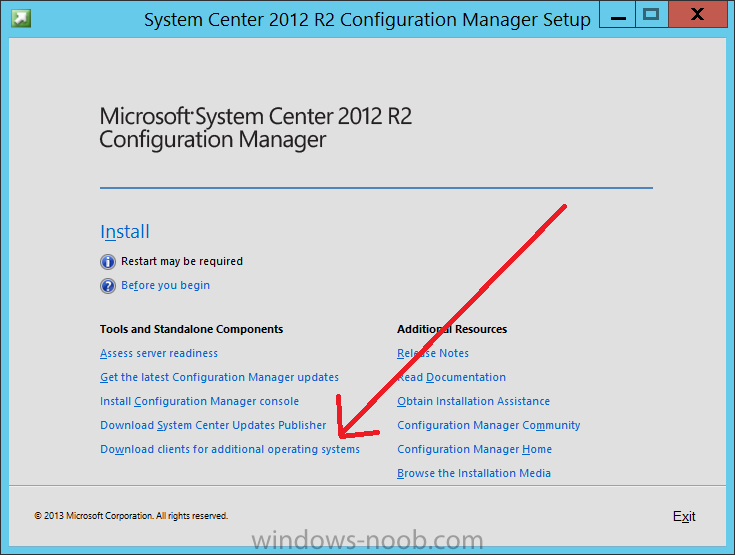
If you did click on the link it would bring you here so go ahead and download those client files.
Step 2. Extract the Linux client files on a Windows computer
On the computer you downloaded the alternative client files, locate the Linux client exe file and extract the contents somewhere local by double clicking on the ConfigMgr Clients for Linux.exe file.
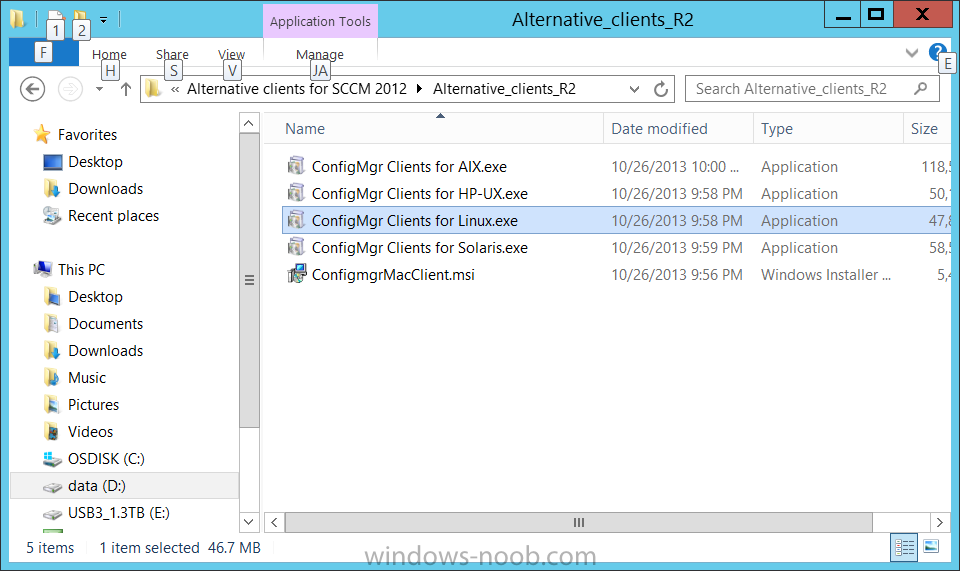
extract the files to…
Continue reading here!
//Richard
#Microsoft launches its #Azure #Hadoop service! – via @maryjofoley
This is really cool!
Microsoft’s cloud-based distribution of Hadoop — which it has been developing for the past year-plus with Hortonworks — is generally available as of October 28.
Microsoft officials also are acknowledging publicly that Microsoft has dropped plans to deliver a Microsoft-Hortonworks developed implementation of Windows Server, which was known as HDInsight Server for Windows. Instead, Microsoft will be advising customers who want Hadoop on Windows Server to go with Hortonworks Data Platform (HDP) for Windows.
Windows Azure HDInsight is “100 percent Apache Hadoop” and builds on top of HDP. HDInsight includes full compatibility with Apache Hadoop, as well as integration with Microsoft’s own business-intelligence tools, such as Excel, SQL Server and PowerBI.
“Our vision is how do we bring big data to a billion people,” said Eron Kelly, Microsoft’s SQL Server General Manager. “We want to make the data and insights accessible to everyone.”
Making the Hadoop big-data framework available in the cloud, so that users can spin up and spin down Hadoop clusters when needed is one way Microsoft intends to meet this goal, Kelly said.
Microsoft and Hortonworks originally announced plans to bring the Hadoop big-data framework to Windows Server and Windows Azure in the fall of 2011. Microsoft made a first public preview of its Hadoop on Windows Server product (known officially as HDInsight Server for Windows) available in October 2012.
Microsoft made available its first public preview of its Hadoop on Windows Azure service, known as HDInsight Service, on March 18. Before that…
Continue reading here!
//Richard
True Scale Out Shared Nothing Architecture – #Compute, #Storage, #Nutanix via @josh_odgers
This is yet another great blog post by Josh! Great work and keep it up! 😉
I love this statement:
I think this really highlights what VMware and players like Google, Facebook & Twitter have been saying for a long time, scaling out not up, and shared nothing architecture is the way of the future.
At VMware vForum Sydney this week I presented “Taking vSphere to the next level with converged infrastructure”.
Firstly, I wanted to thank everyone who attended the session, it was a great turnout and during the Q&A there were a ton of great questions.
I got a lot of feedback at the session and when meeting people at vForum about how the Nutanix scale out shared nothing architecture tolerates failures.
I thought I would summarize this capability as I believe its quite impressive and should put everyone’s mind at ease when moving to this kind of architecture.
So lets take a look at a 5 node Nutanix cluster, and for this example, we have one running VM. The VM has all its data locally, represented by the “A” , “B” and “C” and this data is also distributed across the Nutanix cluster to provide data protection / resiliency etc.

So, what happens when an ESXi host failure, which results in the Nutanix Controller VM (CVM) going offline and the storage which is locally connected to the Nutanix CVM being unavailable?
Firstly, VMware HA restarts the VM onto another ESXi host in the vSphere Cluster and it runs as normal, accessing data both locally where it is available (in this case, the “A” data is local) and remotely (if required) to get data “B” and “C”.

Secondly, when data which is not local (in this example “B” and “C”) is accessed via other Nutanix CVMs in the cluster, it will be “localized” onto the host where the VM resides for faster future access.
It is importaint to note, if data which is not local is not accessed by the VM, it will remain remote, as there is no benefit in relocating it and this reduces the workload on the network and cluster.
The end result is the VM restarts the same as it would using traditional storage, then the Nutanix cluster “curator” detects if any data only has one copy, and replicates the required data throughout the cluster to ensure full resiliency.
The cluster will then look like a fully functioning 4 node cluster as show below.

The process of repairing the cluster from a failure is commonly incorrectly compared to a RAID pack rebuild. With a raid rebuild, a small number of disks, say 8, are under heavy load re striping data across a hot spare or a replacement drive. During this time the performance of everything on the RAID pack is significantly impacted.
With Nutanix, the data is distributed across the entire cluster, which even with a 5 node cluster will be at least 20 SATA drives, but with all data being written to SSD then sequentially offloaded to SATA.
The impact of this process is much less than a RAID…
Continue reading here!
//Richard




 The IT Melting Pot!