Archive
Hosting #Citrix Desktops from the #Amazon Cloud – #AWS, #BYOD, #DaaS, #NetScaler
A good blog post by Ken Oestreich.
That’s right. Run your XenApp on AWS and NetScaler on AWS .
Those capabilities has been around for a while, and over time Citrix has been working to make set-up and configuration even easier.
Whether you are a large enterprise, smaller business, or even a service provider, deploying on the AWS cloud could yield you many more benefits and operational advantages than you could get than deploying XenApp on your own equipment.
Is it for me?
It could be. If you answer “yes” to any of the following, you may want to look more closely:
- You’re Moving infrastructure to the cloud – if you wish to leverage the cloud to host infrastructure – either for convenience, cost, capital expense avoidance, availability, or other attributes.
- You’re Cost-conscious – Amazon’s EC2 cloud often provides customers with a significant reduction in hardware, networking and/or storage costs, particularly due to the pay-as-you-go nature of EC2 capacity. This helps avoid over-provisioning, and allows for real-time matching of capacity to demand.
- You don’t have a data center – Many customers chose to avoid building on-premesis data centers altogether while remaining staunch believers in Citrix software. These are small/medium businesses require agile – and often outsourced – infrastructure
- You have modest administration/deployment knowledge – Many customers prefer not to invest in the skills needed to maintain data center hardware, but insist on retaining application administration skills. Leveraging IaaS infrastructure in the cloud is the ideal approach whereby hardware configuration and maintenance is avoided.
- You have a dynamic business that needs to quickly react to change – Businesses with significant growth curves or seasonality often over-provision infrastructure for peak use, locking-up precious fixed capital that is frequently idle.
Tools, resources, economics
The Citrix community has made available Amazon CloudFormation scripts that greatly simplify configuration, set-up and operation of large-scale XenApp instances. We also have spent hours looking at the economics of running your Citrix infrastructure on AWS. These include
We also make it easy to use products/licenses on AWS…
Continue reading here!
//Richard
Finally multi-site and enterprise readiness of #StoreFront subscription DB! – #Citrix
This has been one of the things that many larger companies where asking for in the earlier versions of StoreFront (and to get rid of the SQL database of course). Before you could not in a supported/good/easy way get the user subscription database that contained all the items (apps and desktops) that the end-user had subscribed to replicated between sites and StoreFront groups.
For instance if you had a datacenter in Stockholm and then one in Beijing, and had a storefront server group at each datacenter and then used GSLB to load balance the StoreFront or Access Gateway access into those then users could travel and then end up on the other StoreFront group of servers and then didn’t have his/her subscriptions… this was not that good but with StoreFront 2.0 there is now support for how to synchronize the subscription database between the stores on the different groups/sites.
This is still a messy configuration I must say, how hard is it to build it into the console Citrix?!?! Same things as many of the config changes that you still have to do in web.config files…. really not that admin-friendly…
But here you find you how to setup the replication “jobs”:
And of course Citrix also added some other features in this new release:
What’s new
Separate database no longer required. The requirement for a separate database has been removed. Users’ application subscription data are stored locally and automatically replicated between StoreFront servers. For more information, see Plan your StoreFront deployment.
High availability and multi-site configuration. To enable load balancing and failover between the deployments providing the desktops and applications, you can define groupings and hierarchies, including specific backup deployments. You can restrict user access to specific resources by mapping deployments to Active Directory user groups. For more information, see StoreFront high availability and multi-site configuration.
Smart card authentication. StoreFront supports smart card authentication through both Receiver for Windows and NetScaler Gateway. Smart card authentication from desktop appliances and repurposed PCs through Desktop Appliance sites and XenApp Services URLs is also supported. For more information, see Use smart cards with StoreFront.
Receiver for HTML5 integration. You can configure Receiver for Web sites to enable users who cannot install Citrix Receiver to access their desktops and applications directly within HTML5-compatible web browsers. For more information, see Receiver for Web sites.
Desktop Appliance sites. You can enable users to access their desktops from non-domain-joined desktop appliances. The web browser on the appliance is configured to access the Desktop Appliance site for a store in full-screen mode at startup. For more information, see Desktop Appliance sites.
Receiver for Web site shortcuts. You can embed on your websites links to desktops and applications available through Receiver for Web sites. For more information, seeReceiver for Web sites.
XenMobile App Controller workflow integration. Receiver for Web site users can subscribe to applications to which you are managing access with App Controller user account management. For more information about App Controller user account management, see Configuring Applications for User Account Management.
What will happen to #XenServer now? – #Citrix, #Virtualization, #IaaS
This is a question that I get a lot these days…. what will happen to XenServer now when Citrix has handed it over to the open source community and that it will be available at XenServer.org. Have they really handed it over, if you think yes; what did they then hand over then though it’s been open source based all along?
Well I suggest that you read a bit about the product strategy etc in this release from Citrix on what the view is:
Key Messages and FAQs for Customers
On June 25, 2013, Citrix announced the availability of the Citrix XenServer 6.2 virtualization platform, which is the first XenServer offering to deliver a full featured, open-source, freely available software package. Citrix is also introducing a new XenServer.org community portal to provide source code access and drive innovation and collaboration around server virtualization and cloud.
Why the change to open source?
Citrix is advancing its strategy around open source with the launch of the XenServer.org community portal to drive innovation, collaboration and discussion around XenServer. As evidenced by the strong industry response to phase 1 of this strategy (move Xen to the Linux Foundation, April 15), open source provides us with a way to better engage with ecosystem partners to enable innovation. Open source also provides alignment with the dominant cloud orchestration platforms of CloudStack and OpenStack and meets cloud builder expectations for source code availability and open APIs. Our move to an open source strategy was chosen for several reasons.
1. Open source is in the Xen / XenSource DNA.
2. Open source software is leading proprietary software in cloud infrastructure.
3. Open source enables collaborative development that drives public trust.
4. Open source communities empower users and broaden market reach.
What is the new XenServer product strategy?
#Citrix #XenDesktop 7 released – #RTW, #BYOD, #HSD, #VDI
Ok, it’s here! The official release is now available for everyone!
There are tons of blog posts and materials already out there and some great features as well that comes with this new release from Citrix. If you haven’t already played with the Excalibur release and know about them I suggest that you start evaluating and testing now!
Here are some good links to have a look at:
- XenDesktop 7 Overview
- XenDesktop 7 Feature matrix
- Excalibur is XenDesktop 7: what does this mean for XenApp and XenDesktop customers?
- XenDesktop 7: Upgrade & migration paths for XenDesktop and XenApp customers
- XenDesktop 7: AppDNA and Platinum Activation
- Reference Architecture: Director and EdgeSight
- XenDesktop 7 edocs – Documentation
- XenDesktop 7 Admin Guide
- XenDesktop 7 Upgrade Guide
- XenDesktop 7 Install Guide
Enjoy! 🙂
//Richard
#BYOD + #Messaging + #Collaboration + #Data securely = How??
Yes, how do you solve this?
I’m running into this topic lately with a lot of people and customers….
It’s around the whole BYOD and unmanaged devices and how useful they are in an enterprise world and all the capabilities and way of working that you’re used to in a secure and still cost effective way (and let’s not forget in a USER FRIENDLY way)!
One question that I’ve not yet found an answer to is:
How do we have all offline capabilities needed for an “Office” worker on a BYOD in our enterprise landscape? How do we ensure that you can use our Messaging, Collaboration and Data/Info services on this totally unmanaged device in a SECURE way?
This is a tough challenge! I guess that most of your users are used to using the Office suite locally on their managed device where they can use Outlook offline, work with data/files in Excel and Word etc offline. But what happens if you tell them to use an unmanaged device or their own personal device of their choice?
All of a sudden there is no real good way of providing them with offline messaging and collaboration (Outlook Anywhere and Lync for instance) capabilities in a secure manner. This BYOD/unmanaged device is not a part of your AD, you have no control and cannot enforce anything! So Outlook that is installed on it may use your Outlook Anywhere service but then its data sits on that unmanaged device unencrypted and unsecured!
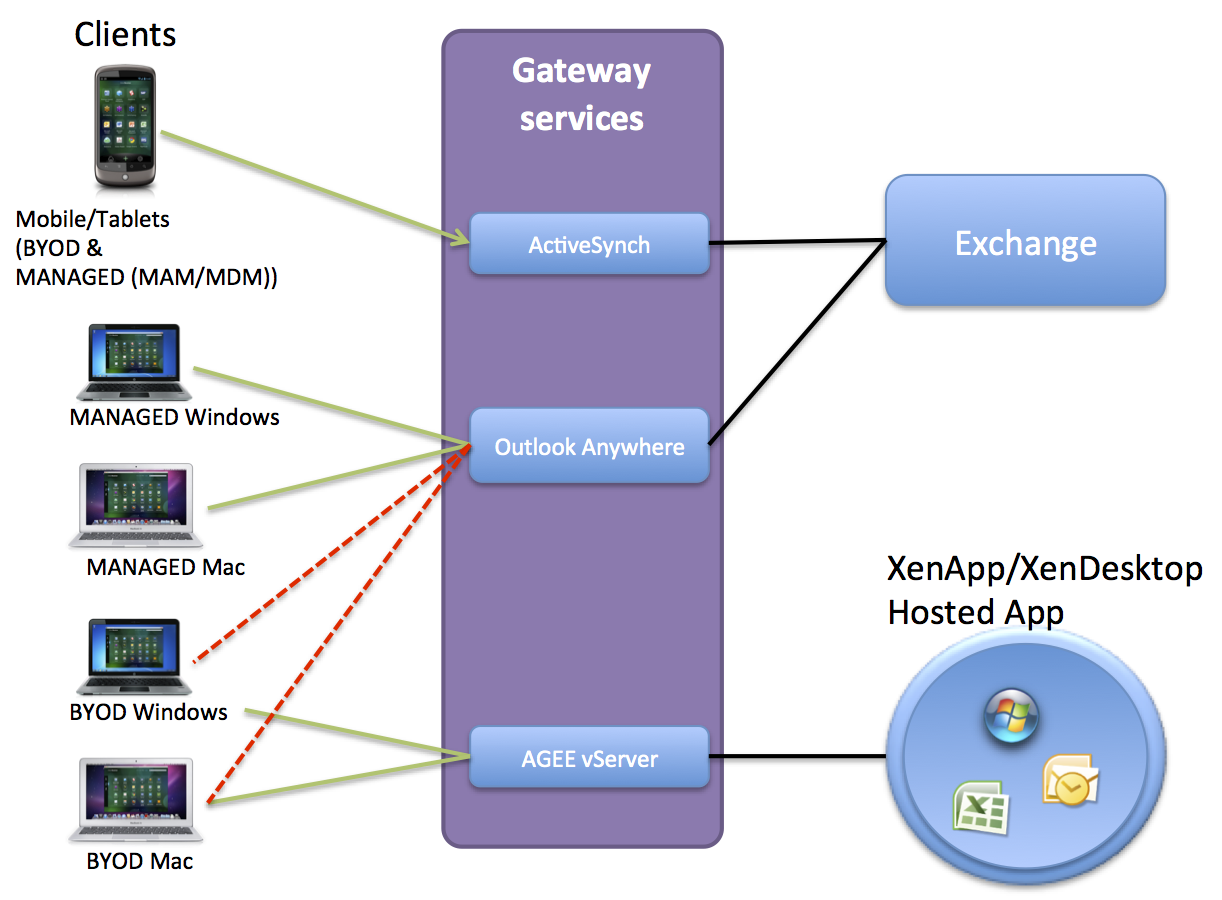
Think of the picture above (yes I know it’s a mess but I just want to illustrate the issue), you have BYOD devices that are running Windows 7, XP, 8 etc and also Mac OS X. What if you open up your Outlook anywhere service to those devices, then all your emails etc. will be unsecured on them!
Citrix and others are focusing on providing this email capability in a secure manner on all mobile OS’s like iOS and Android etc through it’s Citrix Worx apps for mail and also the newly announced Hosted MobileMail. But these are more or less just targeted against mobile devices (smartphones and tablets), but what about the standard laptop users!?!?! They need something as well!
And Windows RMS and other solutions just wont fit very well here… Citrix XenVault was something that could have worked to enable offline support for corporate Messaging services but it’s not there… I’d like to run corporate apps locally on the device offline in a secure and controllable container!!
The same issue you have with Data!!!
ShareFile doesn’t support encryption on Windows or OS X!!!
But it does on mobile devices.. I guess you have to trust your users and BYOD devices that they are encrypted using BitLocker or FileVault etc…. but can you?
So please enlighten me here what the missing puzzle piece is!! Because I have a hard time taking away a managed device form a user and tell them that they on their BYOD device HAVE TO BE ONLINE TO WORK! It’s a step back from a usability and productiveness point of view… but it may be a cost saver though… but is a BYOD/unmanaged device and a VDI or Hosted Shared Desktop always a good option to provide business apps to that laptop? NO! I guess everyone have understood that making business apps and functions web-based or mobile app based is good and a lot of focus is there, but we cannot forget the traditional productive device that the laptop is!
If you know the magic solution to these challenges please let me know! 🙂
Cheers!
//Richard
Top 10 #CitrixSynergy sessions…watch them today!
Have a look at the 10 most popular Citrix synergy sessions! They are now uploaded and ready for you to see:
- SYN501: Geek Speak Tonight! (Desktop Virtualization panel) & SYN501 (Mobility panel)
- SYN415: Advanced best practices for migrating from Web Interface to StoreFront
- SYN321: Next-generation desktop and app delivery with XenDesktop 7, Microsoft System Center 2012
- SYN334: What’s new in XenDesktop and XenApp Platinum
- SYN320: XenDesktop 7: what you should know about FlexCast management architecture and XenApp migration
- SYN299: One Step Beyond – An audience with the Citrix CTO’s
- SYN322: XenDesktop 7: reinventing HDX for mobile, 3D graphics and beyond
- SYN222: Architecting a global XenApp farm with regional users using NetScaler and StoreFront
- SYN404: Introducing the Citrix Diagnostic Toolkit
- SYN206: What’s new in ShareFile Enterprise
Continue reading here!
//Richard
#Apache #CloudStack grows up – #Citrix, #IaaS – via @sjvn
On June 4th, the 4.1.0 release of the Apache CloudStack Infrastructure-as-a-Service (IaaS) cloud orchestration platform arrived. This is the first major CloudStack release since its March 20th graduation from the Apache Incubator.

It’s also the first major release of CloudStack since Citrix submitted the project to the Apache Foundation in 2012. Apache CloudStack is an integrated software platform that enables users to build a feature-rich IaaS. Apache claims that the new version includes an “intuitive user interface and rich API [application programming interface] for managing the compute, networking, accounting, and storage resources for private, hybrid, or public clouds.”
This release includes numerous new features and bug fixes from the 4.0.x cycle. It also includes major changes in the codebase to make CloudStack easier for developers; a new structure for creating RPM/Debian packages; and completes the changeover to using Maven, the Apache software project management tool.
Apache CloudStack 4.1.0’s most important new features are:
- An API discovery service that allows an end point to list its supported APIs and their details.
- Added an Events Framework to CloudStack to provide an “event bus” with publish, subscribe, and unsubscribe semantics. Includes a RabbitMQ plug-in that can interact with AMQP (Advanced Message Queuing Protocol) servers.
- Implement L3 router functionality for the VMware Nicira network virtualization platform (NVP) plug-in
- Support for Linux’s built-in Kernel-based Virtual Machine (KVM) virtualization with NVP L3 router
functionality. - Support for AWS (Amazon Web Service) style regions
What all this adds up to, according to CloudStack Project Management Committee (PMC) member Joe Brockmeier, is that today’s CloudStack is “a mature, stable project, [that] is also free as in beer and speech. We believe that if you’re going to be building an IaaS cloud for private or public consumption, you’ll be better served choosing an open platform that any organization can participate in and contribute to.”
Brockmeier concluded, “CloudStack is a very mature offering that’s relatively easy to deploy and manage, and it’s known to power some very large clouds–e.g., Zynga with tens of thousands of nodes–and very distributed clouds–such as DataPipe, which…
Continue reading here!
//Richard
Citrix Worx Apps announced! – part 2, #CitrixSynergy, #BYOD
Hi again,
Ok, yesterday I posted that Citrix announces the Worx apps which I think is a GREAT story and it looks as the killer apps!
Citrix Worx Apps announced! #CitrixSynergy, #BYOD
I got you excited I guess, but this is of course also not something that we’ll see released in May! The first release now in June will release the Worx Enroll and Worx Home apps, but Worx Home will only be the “store” for Mobile and Web apps. The XenDesktop/XenApp integration comes in the next release so until then the Receiver is still the client for that type of delivery.
I got to play around with Worx Home a bit yesterday and I really liked the way it displays the apps and how they easily can be sorted in a groups by type or folder structure. And then when you get XA/XD items in there and they are placed right next to all the other apps on your mobile device and you can launch Excel from you iPad directly instead of going through and opening the Worx Home or Receiver app the integration is really user friendly. But then again; don’t we still for the majority of the use cases think that XA/XD are “legacy” solutions? wouldn’t we rather strive to get into a complete SaaS model instead of adding these expensive hosted solutions? I know it won’t go away and there are great use cases for XA and XD but I would still say it’s legacy, park it and contain it and work on your strategy to change the model and become future ready! 😉
And for those that don’t go off and purchase the Mobile Solution Bundle in the future can continue to use the Receiver for their “legacy” XenApp/XenDesktop service delivery. The question is how this will be evolving though, I foresee a risk that to much of the focus in the future will be agains the Worx apps and that is something that may lead to longer release cycles of fixes and updates of the Receiver. That my of course not be an issue either though many companies today are struggling with that Citrix “goes to fast” and it’s hard to keep up (and Citrix has a hard time keeping up as well).
Stay tuned for a more complete update after Synergy!
//Richard
Citrix Worx Apps announced! #CitrixSynergy, #BYOD
“Worx Enroll” and “Worx Home” apps announced to support the MDM, MAM, Web, Saas and Win apps/desktop (XA/XD) from ONE STORE!!
This is something that we all have been waiting for!! Finally a one-stop-shop/app in where an end user can use their personal devices and consume MAM, MIM and WaaS (Windows as a Service) deliverables without enrolling to a full MDM service. And those devices that are corporate assets enables you to do the same delivery and add the MDM capabilities needed (e.g: geofencing, pass code and other policies and asset mgmt) with the same end user UI!!!
I want to see this in action and get my hands on it NOW! 😉
//Richard




 The IT Melting Pot!