Archive
#XenMobile Mobility promotion from #Citrix – #EMM, #BYOD, #XenDesktop
XenMobile mobile device management (MDM) or enterprise mobile management (EMM) capabilities for the price of Software Maintenance!
Personally I wonder if this is a move triggered by VMware’s acquisition of AirWatch where Citrix now is kind of pushing it’s MDM solution out the door to really get some more market, and at the same time push VMware to give their new MDM capabilities away together with Horizon View…
This is an interesting and good action, thank you Citrix!
XenApp and XenDesktop Platinum Mobility Promotion
Promotion effective From January 31, 2014 to September 30, 2014
|
The XenApp and XenDesktop Platinum Mobility Promotion is a limited-time promotion that offers new or existing XenApp or XenDesktop Platinum customers with perpetual licenses current on Subscription Advantage (SA) the ability to receive FREE XenMobile MDM edition licenses or get 20% off XenMobile Enterprise licenses with the purchase of first year Software Maintenance for all licenses obtained via this promotion. For either XenMobile promotion options, the maximum number of discounted licenses customers can purchase is based on the total number of XenApp and XenDesktop Platinum licenses owned. XenMobile MDM edition provides key device-level security capabilities for users accessing XenApp and XenDesktop desktops and apps on mobile devices. The mobile device management (MDM) solution lets you:
XenMobile Enterprise edition supports the next step in your EMM strategy by complementing the device-level security capabilities of XenMobile MDM edition with app-level security features. These include:
|
Continue reading here!
//Richard
#XenApp 7.5 is launching! – #Citrix, #HSD, #DaaS, #VDI
Wow… this is really interesting and “weird” I must say…
XenApp is back! 🙂
And of course AppDNA is in there as well to simplify software/application management on this platform.
Description
New Citrix XenApp 7.5 makes it simple to deliver any Windows app to an increasingly mobile workforce, while leveraging the cost saving and elasticity of hybrid clouds and the security of mobile device management. Learn more at http://www.citrix.com/xenapp
Hear more about it in this video!
The video above was removed because of that it was accidentally published too early.. but you can find it on YouTube here:
//Richard
Sizing #XenDesktop 7 App Edition VMs – #Citrix
A good update on VM sizing by Daniel Feller!
In the Mobilizing Windows applications for 500 users design guide, we made the recommendation to allocate 8vCPUs for each virtual XenDesktop 7 App Edition host (formerly known as XenApp). Spreading this out across a server with two Intel Xeon E5-2690 @2.9GHz processors and 192 GB of RAM, we were yielding about 200 users per physical server and roughly 50 users per virtual server.
Of course, the design guide is the end result of a lot of testing by the Citrix Solutions Lab. During the tests, we had the Solutions Lab compare many (and I mean many) different configurations where they changed the number of vCPU, RAM size, and RAM allocation (dynamic/static) as well as a few other things. All of these tests were done with Windows Server 2012 with Hyper-V. We ended up with the following:

A few interesting things:
- Dynamic vs static RAM in Hyper-V appeared to have little, if any, impact on overall scalability. The only time when the RAM allocation had a negative impact was when not enough RAM was allocated (no surprise there).
- The 8vCPU and the 4vCPU configurations resulted in very similar user concurrency levels. Get ready… The battle is about to begin as to whether we should use 8 or 4 vCPU. (Is anyone else besides me having flashbacks to 2009?)
A few years ago, we debated about using 2vCPU or 4vCPU for XenApp 5 virtual machines. A few years later, the debate is resurfacing but this time, the numbers have doubled: 4 or 8. Here is what you should be thinking about… VMs are getting bigger because the hardware is getting faster, RAM is getting cheaper and the hypervisors are getting better…
Continue reading here!
//Richard
How to pick virtualization (HW, NW, Storage) solution for your #VDI environment? – #Nutanix, @StevenPoitras
Here we are again… a lot of companies and Solution Architects are scratching their heads thinking about how we’re going to do it “this time”.
Most of you out there have something today, probably running XenApp on your VMware or XenServer hypervisor with a FC SAN or something, perhaps provisioned using PVS or just managed individually. There is also most likely a “problem” with talking to the Storage team that manage the storage service for the IaaS service that isn’t built for the type of workloads that XenApp and XenDesktop (VDI) requires.
So how are you going to do it this time? Are you going to challenge the Storage and Server/IaaS service and be innovative and review the new cooler products and capabilities that now exists out there? They are totally changing the way that we build Virtual Cloud Computing solutions where; business agility, simplicity, cost savings, performance and simple scale out is important!
There is no one solution for everything… but I’m getting more and more impressed by some of the “new” players on the market when it comes to providing simple and yet so powerful and performing Virtual Cloud Computing products. One in particular is Nutanix that EnvokeIT has partnered with and they have a truly stunning product.
But as many have written in many great blog posts about choosing your storage solution for your VDI solution you truly need to understand what your service will require from the underlying dependency services. And is it really worth to do it the old way? You have your team that manages the IaaS service, and most of the times it just provides a way for ordering/provisioning VM’s, then the “VDI” team leverages that one using PVS or MCS. Some companies are not even where they can order that VM as a service or provision it from the Image Provisioning (PVS/MCS) service, everything is manual and they call it a IaaS service… is it then a real IaaS service? My answer would be now… but let’s get back to the point I was trying to make!
This HW, Hypervisor, Network, Storage (and sometimes orchestrator) components are often managed by different teams. Each team are also most of the times not really up to date in terms of understanding what a Virtualization/VDI service will require from them and their components. They are very competent in understanding the traditional workload of running a web server VM or similar, but not really dealing with boot storms from hundreds to thousands of VDI’s booting up, people logging in at the same time and the whole pattern of IOPS that is generated in these VM’s “life-cycle”.
This is where I’d suggest everyone to challenge their traditional view on building Virtualization and Storage services for running Hosted Shared Desktop (XenApp/RDS) and Hosted Virtual Desktop (VDI/XenDesktop) on!
You can reduce the complexity, reduce your operational costs and integrate Nutanix as a real power compute part of your internal/private cloud service!
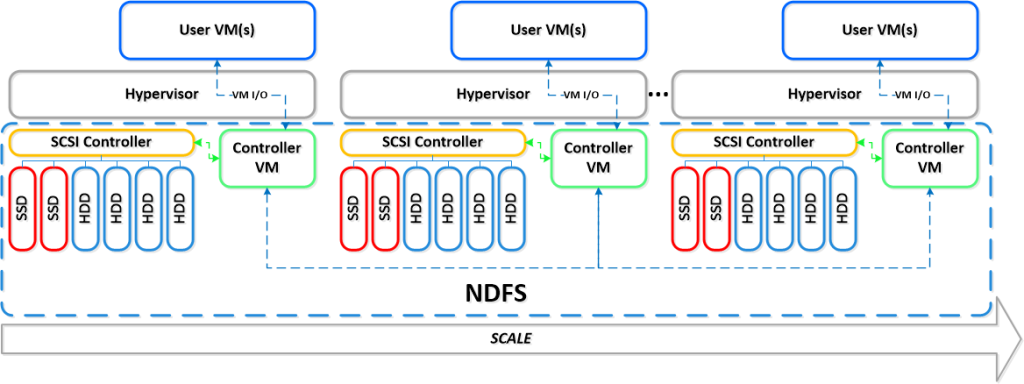
One thing that also is kind of cool is the integration possibilities of the Nutanix product with OpenStack and other cloud management products through its REST API’s. And it supports running both Hyper-V, VMware ESXi and KVM as hypervisors in this lovely bundled product.
If you want the nitty gritty details about this product I highly recommend that you read the Nutanix Bible post by Steven Poitras here.

How to: #Citrix #XenMobile 8.5 MAM upgrade! Part 2 – #StoreFront, #AppController, #NetScaler
Hi again!
If you haven’t read Part 1 then I highly recommend doing so prior to going directly to the upgrade that we’re covering in this post!
Prepare for a journey in this post about Citrix StoreFront upgrade, uninstallation, console and how messy it could be! NOT all the time, sometimes it “just works”! 😉
My little NetScaler is already upgraded to 10.1 so unfortunately I couldn’t take you on that journey as well, so we’ll start with the StoreFront upgrade from 1.2 to 2.0 in this post. These are the steps that we need to cover as highlighted in the migration guide that seems very short and straight forward:
Upgrade StoreFront 1.2 to 2.0.
- Logon to the StoreFront server console.
- Upgrade StoreFront by running the StoreFront 2.0 installer as an administrator.
- When the upgrade is completed, open StoreFront administration snap-in, remove CloudGateway controller from each store as this will be moved in the migration solution.
- Open NetScaler Gateway Properties and for each gateway defined and change the version field in settings from 9.x to 10.0.x or later.
- Test the configuration by logging on through web browser or Citrix Receiver.
- Verify if the users are able to login and authenticate to StoreFront defined stores configured.
Is it this easy?
Ok, I’ve downloaded the 2.0 installer, and I’m logged on to the server.
Before we even start the upgrade there are things that could go wrong in removal or upgrades of StoreFront. And one that I’ve seen cause a lot of headache for a lot of people out there is that they have the Windows Firewall service disabled. Though the installation and removal wants to delete or add these rules the installation will fail unless this service is running. As you can see in this picture below you see the FW rule added in StoreFront 1.2:

So let’s verify that the Windows FW service is started, and it is!

I’ll now start the installation by double-clicking the StoreFront 2.0 installer!

What is this popup that came directly after starting the installer?

Wait, ok so you guys at Citrix couldn’t ask me whether you could do this for me? My plan is to upgrade, so please just add a little step in your upgrade program that does this for me… change request #1 for the next SF release and it’s upgrade process! Verify pre-requisites or deal with them!
True or False: Always use Provisioning Services – #Citrix, #PVS, #MCS
Another good blog post from Daniel Feller:
Test your Citrix muscle…
True or False: Always use Provisioning Services
Answer: False
There has always been this aura around Machine Creation Services in that it could not hold a candle to Provisioning Services; that you would be completely insane to implement this feature in any but the simplest/smallest deployments.
How did we get to this myth? Back in March of 2011 I blogged about deciding between MCS and PVS. I wanted to help people decide between using Provisioning Services and the newly released Machine Creation Services. Back in 2011, MCS an alternative to PVS in that MCS was easy to setup, but had some limitations when compared to PVS. My blog and decision tree were used to help steer people into the PVS route except for the use cases where MCS made sense.
Two and a half years passed and over that time, MCS has grown up. Unfortunately, I got very busy and didn’t keep this decision matrix updated. I blame the XenDesktop product group. How dare they improve our products. Don’t they know this causes me more work? 
It’s time to make some updates based on improvements of XenDesktop 7 (and these improvements aren’t just on the MCS side but also on the PVS side as well).

So let’s break it down:
- Hosted VDI desktops only: MCS in XenDesktop 7 now supports XenApp hosts. This is really cool, and am very happy about this improvement as so many organizations understand that XA plays a huge part in any successful VDI project.
- Dedicated Desktops: Before PVD, I was no fan of doing dedicated VDI desktops with PVS. With PVD, PVS dedicated desktops is now much more feasible, like it always was with MCS
- Boot/Logon Storms: PVS, if configured correctly, would cache many of the reads into system memory, helping to reduce the Read IOPS. Hypervisors have improved over the past 2 years to help us with the large number of Read disk operations. This helps lessen the impact of the boot/logon storms when using MCS.
#Citrix #PVS vs. #MCS Revisited – #Nutanix, #Sanbolic
Another good blog post from Citrix and Nick Rintalan around the famous topic whether to go for PVS or MCS! If your thinking about this topic then don’t miss this article. Also ensure that you talk to someone who have implemented an image mgmt/provisioning service like this to get some details on lessons learnt etc., also with the change in the hypervisor layer and the cache features this is getting really interesting…
AND don’t forget the really nice storage solutions that exists out there like Nutanix and Melio that really solves some challenges out there!!
http://go.nutanix.com/rs/nutanix/images/TG_XenDesktop_vSphere_on_Nutanix_RA.pdf
Melio Solutions – Virtual Desktop Infrastructure
Back to the Citrix blog post:
It’s been a few months since my last article, but rest assured, I’ve been keeping busy and I have a ton of stuff in my head that I’m committed to getting down on paper in the near future. Why so busy? Well, our Mobility products are keeping me busy for sure. But I also spent the last month or so preparing for 2 different sessions at BriForum Chicago. My colleague, Dan Allen, and I co-presented on the topics of IOPS and Folder Redirection. Once Brian makes the videos and decks available online, I’ll be sure to point people to them.
So what stuff do I want to get down on paper and turn into a future article? To name a few…MCS vs. PVS (revisited), NUMA and XA VM Sizing, XenMobile Lessons Learned “2.0″, and Virtualizing PVS Part 3. But let’s talk about that first topic of PVS vs MCS now.
Although BriForum (and Synergy) are always busy times, I always try to catch a few sessions by some of my favorite presenters. One of them is Jim Moyle and he actually inspired this article. If you don’t know Jim, he is one of our CTPs and works for Atlantis Computing – he also wrote one of the most informative papers on IOPS I’ve ever read. I swear there is not a month that goes by that I don’t get asked about PVS vs. MCS (pros and cons, what should I use, etc.). I’m not going to get into the pros and cons or tell you what to use since many folks like Dan Feller have done a good job of that already, even with beautiful decision trees. I might note that Barry Schiffer has an updated decision tree you might want to check out, too. But I do want to talk about one of the main reasons people often cite for not using MCS – it generates about “1.6x or 60% more IOPS compared to PVS“. And ever since Ken Bell sort of “documented” this in passing about 2-3 years ago, that’s sort of been Gospel and no one had challenged it. But our CCS team was seeing slightly different results in the field and Jim Moyle also decided to challenge that statement. And Jim shared the results of his MCS vs. PVS testing at BriForum this year – I think many folks were shocked by the results.
What were those results? Here is a summary of the things I thought were most interesting:
- MCS generates 21.5% more average IOPS compared to PVS in the steady-state (not anywhere near 60%)
- This breaks down to about 8% more write IO and 13% more read IO
- MCS generates 45.2% more peak IOPS compared to PVS (this is closer to the 50-60% range that we originally documented)
- The read-to-write (R/W) IO ratio for PVS was 90%+ writes in both the steady-state and peak(nothing new here)
- The R/W ratio for MCS at peak was 47/53 (we’ve long said it’s about 50/50 for MCS, so nothing new here)
- The R/W ratio for MCS in the steady-state was 17/83 (this was a bit of a surprise, much like the first bullet)
So how can this be?!?
I think it’s critical to understand where our initial “1.5-1.6x” or “50-60%” statement comes from – that takes into account not just the steady-state, but also the boot and logon phases, which are mostly read IOPS and absolutely drive up the numbers for MCS. If you’re unfamiliar with the typical R/W ratios for a Windows VM during the various stages of its “life” (boot, logon, steady-state, idle, logoff, etc.), then this picture, courtesy of Project VRC, always does a good job explaining it succinctly:

We were also looking at peak IOPS and average IOPS in a single number – we didn’t provide two different numbers or break it down like Jim and I did above in the results, and a single IOPS number can be very misleading in itself. You don’t believe me? Just check out my BriForum presentation on IOPS and I’ll show you several examples of how…
Continue reading here!
//Richard
Remote Desktop Services are now allowed on #Windows #Azure – #RDS, #TS, #XenDesktop
This is a great thing that you should have a look at and investigate how it would fit you and your organization! Finally Microsoft has changed the license model! They still have some work to be done on it though so we can run Virtual Desktops (VDI’s) as well!! 😉
Read this great blog post from lpanzano:
I’ve not seen a lot of news about this so I thought it was worth writing a short post just to remember everyone that on July 1st, Microsoft has officially changed Windows Azure licensing terms (PUR) to allow the use of Remote Desktop Services (RDS) on Windows Azure Virtual Machines. Previously this scenario was not allowed in Windows Azure. Before July 1st you could only access an Azure Windows Server VM for purpose of server administration or maintenance (up to 2 simultaneous sessions are authorized for this service).
Let’s see some details about this change:
-
To enable more than 2 simultaneous sessions you will need to purchase RDS Subscriber Access Licenses (SALs) through the Microsoft Services Provider Licensing Agreement (SPLA) for each user or device that will access your solution on Windows Azure. SPLA is separate from an Azure agreement and is contracted through an authorized SPLA reseller. Click here for more information about SPLA benefits and requirements.
-
RDS Client Access Licenses (CALs) purchased from Microsoft VL programs such as EA, do not get license mobility to shared cloud platforms, hence they cannot be used on Azure.
-
Windows ‘Client’ OS (e.g. Windows 8) virtual desktops, or VDI deployments, will continue to not be allowed on Azure, because Windows client OS product use rights prohibit such use on multi-tenant/shared cloud environments.
-
Customers can use 3rd party application hosting products that require RDS sessions functionality (e.g. Citrix XenDesktop), subject to product use terms set by those 3rd party providers, and provided these products leverage only RDS session-hosting (Terminal Services) functionality. Note that RDS SALs are still required when using these 3rd party products.
Continue reading this post here!
Citrix also created a good blog post on their view of the top 5 scenarios for putting XenDesktop on Azure:
Top 5 Scenarios for XenDesktop on Windows Azure
Since Windows Azure launched I have looked forward to the day Citrix would be able to work jointly with Microsoft to support XenDesktop and XenApp workloads. We are excited that today is the day we announce support for XenDesktop 7 and XenApp 6.5 on Windows Azure. Customers can now take advantage of the leading Citrix desktop virtualization solution and all of the HDX user experience goodness on Microsoft’s leading public cloud. With the announcement we’ve published two design guides (here andhere) to help get you started with your deployments.
NEW #Citrix Apps and Desktops certifications – #CCIA, #CCE, #CCA, #XenDesktop
Ok, Citrix has now released the new certifications! Have a look, plan, study and take them! 😉
Now in Beta and launching live in early Q4 – a new solutions-focused certification program designed to validate IT professional skills for strategic app and desktop solutions in support of Citrix XenDesktop 7.

- Citrix Certified Associate – Apps and Desktops (CCA-AD) validates the skills IT operators and administrators need to manage, maintain, monitor and troubleshoot XenDesktop 7 solutions.
- Prepare with the Managing Citrix XenDesktop 7 Solutions training course.
- Pass the Managing Citrix XenDesktop 7 Solutions exam.
- Citrix Certified Professional – Apps and Desktops (CCP-AD) validates the skills experienced IT solution builders, such as engineers and consultants, need to install, configure and roll out common XenDesktop 7 solutions.
- Obtain the CCA-AD certification.
- Prepare with the Deploying Citrix XenDesktop 7 Solutions training course.
- Pass the Deploying Citrix XenDesktop 7 Solutions exam.
- Citrix Certified Expert – Apps and Desktops (CCE-AD) validates the skills experienced IT solution designers, such as architects, engineers and consultants need to assess and design comprehensive XenDesktop 7 solutions.
- Obtain the CCP-AD certification.
- Prepare with the Designing Citrix XenDesktop 7 Solutions training course .
- Pass the Designing Citrix XenDesktop 7 Solutions exam.
Update Paths
We have a simple transition path for you.
CCIAs and CCEEs may update to the new equivalent level by passing only one exam. Eligibility to update will require an unexpired credential. The update path for existing CCIAs and CCEEs will be available until this first version of the CCE-AD or CCP-AD exams are retired. We will provide 3 months notice of any changes to the update requirements or update path availability.
Existing Citrix Certified Administrators (CCAs) and Citrix…
Continue reading here!
//Richard
Hosting #Citrix Desktops from the #Amazon Cloud – #AWS, #BYOD, #DaaS, #NetScaler
A good blog post by Ken Oestreich.
That’s right. Run your XenApp on AWS and NetScaler on AWS .
Those capabilities has been around for a while, and over time Citrix has been working to make set-up and configuration even easier.
Whether you are a large enterprise, smaller business, or even a service provider, deploying on the AWS cloud could yield you many more benefits and operational advantages than you could get than deploying XenApp on your own equipment.
Is it for me?
It could be. If you answer “yes” to any of the following, you may want to look more closely:
- You’re Moving infrastructure to the cloud – if you wish to leverage the cloud to host infrastructure – either for convenience, cost, capital expense avoidance, availability, or other attributes.
- You’re Cost-conscious – Amazon’s EC2 cloud often provides customers with a significant reduction in hardware, networking and/or storage costs, particularly due to the pay-as-you-go nature of EC2 capacity. This helps avoid over-provisioning, and allows for real-time matching of capacity to demand.
- You don’t have a data center – Many customers chose to avoid building on-premesis data centers altogether while remaining staunch believers in Citrix software. These are small/medium businesses require agile – and often outsourced – infrastructure
- You have modest administration/deployment knowledge – Many customers prefer not to invest in the skills needed to maintain data center hardware, but insist on retaining application administration skills. Leveraging IaaS infrastructure in the cloud is the ideal approach whereby hardware configuration and maintenance is avoided.
- You have a dynamic business that needs to quickly react to change – Businesses with significant growth curves or seasonality often over-provision infrastructure for peak use, locking-up precious fixed capital that is frequently idle.
Tools, resources, economics
The Citrix community has made available Amazon CloudFormation scripts that greatly simplify configuration, set-up and operation of large-scale XenApp instances. We also have spent hours looking at the economics of running your Citrix infrastructure on AWS. These include
We also make it easy to use products/licenses on AWS…
Continue reading here!
//Richard




 The IT Melting Pot!