Archive
#Citrix #XenApp 6.5 Hosted Shared Desktop Sizing Example
Great Citrix blog post series from Andy Baker!
In this blog series I’m taking a look at scalability considerations for XenApp 6.5 Hosted Shared Desktops, specifically:
- How to estimate XenApp 6.5 Hosted Shared Desktop scalability
- What’s the optimal XenApp 6.5 VM specification?
- XenApp 6.5 Hosted Shared Desktop sizing example
My last post provided guidance on the optimal XenApp virtual machine specification. Now in the last post of the series, I’m going to walk through an example sizing exercise.
Scenario
Company ABC recently completed a user segmentation exercise. The following table includes 8 user groups that have been identified as good candidates for a Hosted Shared Desktop. None of these user groups requires the ability to install applications or the ability to customize their desktop beyond profile based changes. Three separate Provisioning Services images will be created due to application compatibility conflicts identified by Citrix AppDNA.

With Hosted Shared Desktops, it is important to consider the ‘Maximum Number of Concurrent Users’ column rather than the ‘Total Number of Users’ column. Sizing the environment for concurrency rather than the total number of users will help to reduce infrastructure costs without affecting performance or availability.
Sufficient redundancy should be incorporated into the sizing estimate so that a single XenApp server or virtualization host failure does not affect the total number of concurrent users that can be supported (n+1).
Company ABC wishes to use their standard hardware specification…
Continue reading here!
//Richard
NetApp Virtual Storage Console for XenServer – #XenServer #CitrixSynergy #NetApp #VCS
This is looking really nice! Have a look at the capabilities of the NetApp VSC plugin for XenServer demo video;
Citrix Synergy 2012 demo: NetApp VSC 1.0 for Citrix XenServer – SR management
Virtual Storage Console reduce cost and complexity with integrated, end-to-end storage management for Citrix infrastructures. Improve administrative efficiency for both your Citrix and storage administrators.
So if you’re a NetApp shop why not try it out?
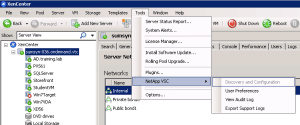
It’s really nice that you can do most of the config from the XenCenter console! I’m right now doing the Cisco UCS and XenDesktop lab here at Synergy and playing around with it and it’s neat! Once the plugin is installed you can interact directly with it from the XenCenter console.
Here you can configure the preferences in a simple way (even though the User Preference console/plugin isn’t the coolest looking tool)!




 The IT Melting Pot!