Archive
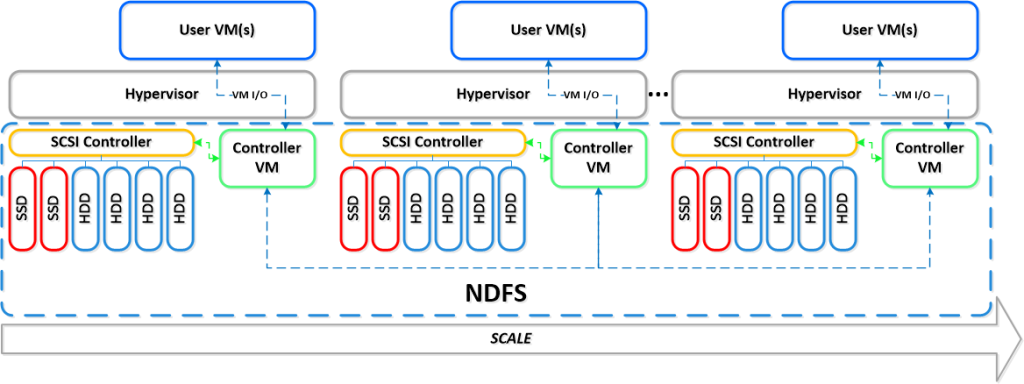
True Scale Out Shared Nothing Architecture – #Compute, #Storage, #Nutanix via @josh_odgers
This is yet another great blog post by Josh! Great work and keep it up! 😉
I love this statement:
I think this really highlights what VMware and players like Google, Facebook & Twitter have been saying for a long time, scaling out not up, and shared nothing architecture is the way of the future.
At VMware vForum Sydney this week I presented “Taking vSphere to the next level with converged infrastructure”.
Firstly, I wanted to thank everyone who attended the session, it was a great turnout and during the Q&A there were a ton of great questions.
I got a lot of feedback at the session and when meeting people at vForum about how the Nutanix scale out shared nothing architecture tolerates failures.
I thought I would summarize this capability as I believe its quite impressive and should put everyone’s mind at ease when moving to this kind of architecture.
So lets take a look at a 5 node Nutanix cluster, and for this example, we have one running VM. The VM has all its data locally, represented by the “A” , “B” and “C” and this data is also distributed across the Nutanix cluster to provide data protection / resiliency etc.

So, what happens when an ESXi host failure, which results in the Nutanix Controller VM (CVM) going offline and the storage which is locally connected to the Nutanix CVM being unavailable?
Firstly, VMware HA restarts the VM onto another ESXi host in the vSphere Cluster and it runs as normal, accessing data both locally where it is available (in this case, the “A” data is local) and remotely (if required) to get data “B” and “C”.

Secondly, when data which is not local (in this example “B” and “C”) is accessed via other Nutanix CVMs in the cluster, it will be “localized” onto the host where the VM resides for faster future access.
It is importaint to note, if data which is not local is not accessed by the VM, it will remain remote, as there is no benefit in relocating it and this reduces the workload on the network and cluster.
The end result is the VM restarts the same as it would using traditional storage, then the Nutanix cluster “curator” detects if any data only has one copy, and replicates the required data throughout the cluster to ensure full resiliency.
The cluster will then look like a fully functioning 4 node cluster as show below.

The process of repairing the cluster from a failure is commonly incorrectly compared to a RAID pack rebuild. With a raid rebuild, a small number of disks, say 8, are under heavy load re striping data across a hot spare or a replacement drive. During this time the performance of everything on the RAID pack is significantly impacted.
With Nutanix, the data is distributed across the entire cluster, which even with a 5 node cluster will be at least 20 SATA drives, but with all data being written to SSD then sequentially offloaded to SATA.
The impact of this process is much less than a RAID…
Continue reading here!
//Richard
Solving the Compute and Storage scalability dilemma – #Nutanix, via @josh_odgers
The topic of Compute, Network and STORAGE is a hot topic as I’ve written in blog posts before this one (How to pick virtualization (HW, NW, Storage) solution for your #VDI environment? – #Nutanix, @StevenPoitras) … and still a lot of colleagues and customers are struggling with finding better solutions and architecture.
How can we ensure that we get the same or better performance of our new architecture? How can we scale in a more simple and linear manner? How can we ensure that we don’t have a single point of failure for all of our VM’s etc..? How are others scaling and doing this in a better way?
I’m not a storage expert, but I do know and read that many companies out there are working on finding the optimal solution for Compute and Storage, and how they can get the cost down and be left with a more simple architecture to manage…
This is a topic that most need to address as well now when more and more organisations are starting to build their private clouds, because how are you going to scale it and how can you get closer to the delivery that the big players provide? Gartner even had Software-Defined-Storage (SDS) as the number 2 trend going forward: #Gartner Outlines 10 IT Trends To Watch – via @MichealRoth, #Nutanix, #VMWare
Right now I see Nutanix as the leader here! They rock! Just have a look at this linear scalability:
If you want to learn more how Nutanix can bring great value please contact us at EnvokeIT!
For an intro of Nutanix in 2 minutes have a look at these videos:
Overview:
#Gartner Outlines 10 IT Trends To Watch – via @MichealRoth, #Nutanix, #VMWare
This is also a good analysis I must say, I think that they are spot on! Even though I think that most companies haven’t addressed the whole Mobility aspect of going away from “managing devices” yet, there are a lot of “BYOD” strategies and solutions that companies still need to work on….
And of course I see a great opportunity to transform and build new “cloud” services/datacenters as well and do it in a more up-to-date, agile, scalable and simple way than what we’ve done over all these years. Stop building the old legacy architecture of Compure, Network and Storage and see what the market leaders of IaaS and PaaS are doing. One of the great players here is of course Nutanix as I see it (contact EnvokeIT if you need more info about this great product)!
Gartner Inc. offered a glimpse of 10 trends for IT professionals to pay attention to over the next five years.
The trends were discussed in a Thursday Webinar by David J. Cappuccio, a research vice president at Gartner. He noted that IT pros are busy enough with daily operations, with “74 percent” of IT budgets devoted to those concerns. Still, he contended that there are lots of new technologies and trends that will have an impact on IT departments.
Gartner expects these trends will affect IT over the next five years:
- “Software-defined networks
- “Software-defined storage
- “Hybrid cloud services
- “Integrated systems
- “Applications acceleration
- “The Internet of things
- “Open Compute Project
- “Intelligent datacenters
- “IT demand
- “Organizational entrenchment and disruptions”
End user expectations are affecting IT. New workers getting out of college are expecting access to everything all of the time, from any device, from anywhere, Cappuccio said. They typically own between three and four devices today, he added.
Software-defined networking (SDN) came into general awareness about two years ago, expecially after SDN pioneer Nicira came out of stealth mode, Cappuccio said. Nicira’s idea was to create a software stack that would manage the real-world physical network. The concept resonated well with the marketplace, and Nicira was bought by VMware in a $1.4 billion purchase. SDN represents a new way to operate networks, which can be configured…
Continue reading here!
//Richard
How to pick virtualization (HW, NW, Storage) solution for your #VDI environment? – #Nutanix, @StevenPoitras
Here we are again… a lot of companies and Solution Architects are scratching their heads thinking about how we’re going to do it “this time”.
Most of you out there have something today, probably running XenApp on your VMware or XenServer hypervisor with a FC SAN or something, perhaps provisioned using PVS or just managed individually. There is also most likely a “problem” with talking to the Storage team that manage the storage service for the IaaS service that isn’t built for the type of workloads that XenApp and XenDesktop (VDI) requires.
So how are you going to do it this time? Are you going to challenge the Storage and Server/IaaS service and be innovative and review the new cooler products and capabilities that now exists out there? They are totally changing the way that we build Virtual Cloud Computing solutions where; business agility, simplicity, cost savings, performance and simple scale out is important!
There is no one solution for everything… but I’m getting more and more impressed by some of the “new” players on the market when it comes to providing simple and yet so powerful and performing Virtual Cloud Computing products. One in particular is Nutanix that EnvokeIT has partnered with and they have a truly stunning product.
But as many have written in many great blog posts about choosing your storage solution for your VDI solution you truly need to understand what your service will require from the underlying dependency services. And is it really worth to do it the old way? You have your team that manages the IaaS service, and most of the times it just provides a way for ordering/provisioning VM’s, then the “VDI” team leverages that one using PVS or MCS. Some companies are not even where they can order that VM as a service or provision it from the Image Provisioning (PVS/MCS) service, everything is manual and they call it a IaaS service… is it then a real IaaS service? My answer would be now… but let’s get back to the point I was trying to make!
This HW, Hypervisor, Network, Storage (and sometimes orchestrator) components are often managed by different teams. Each team are also most of the times not really up to date in terms of understanding what a Virtualization/VDI service will require from them and their components. They are very competent in understanding the traditional workload of running a web server VM or similar, but not really dealing with boot storms from hundreds to thousands of VDI’s booting up, people logging in at the same time and the whole pattern of IOPS that is generated in these VM’s “life-cycle”.
This is where I’d suggest everyone to challenge their traditional view on building Virtualization and Storage services for running Hosted Shared Desktop (XenApp/RDS) and Hosted Virtual Desktop (VDI/XenDesktop) on!
You can reduce the complexity, reduce your operational costs and integrate Nutanix as a real power compute part of your internal/private cloud service!
One thing that also is kind of cool is the integration possibilities of the Nutanix product with OpenStack and other cloud management products through its REST API’s. And it supports running both Hyper-V, VMware ESXi and KVM as hypervisors in this lovely bundled product.
If you want the nitty gritty details about this product I highly recommend that you read the Nutanix Bible post by Steven Poitras here.

#Citrix #PVS vs. #MCS Revisited – #Nutanix, #Sanbolic
Another good blog post from Citrix and Nick Rintalan around the famous topic whether to go for PVS or MCS! If your thinking about this topic then don’t miss this article. Also ensure that you talk to someone who have implemented an image mgmt/provisioning service like this to get some details on lessons learnt etc., also with the change in the hypervisor layer and the cache features this is getting really interesting…
AND don’t forget the really nice storage solutions that exists out there like Nutanix and Melio that really solves some challenges out there!!
http://go.nutanix.com/rs/nutanix/images/TG_XenDesktop_vSphere_on_Nutanix_RA.pdf
Melio Solutions – Virtual Desktop Infrastructure
Back to the Citrix blog post:
It’s been a few months since my last article, but rest assured, I’ve been keeping busy and I have a ton of stuff in my head that I’m committed to getting down on paper in the near future. Why so busy? Well, our Mobility products are keeping me busy for sure. But I also spent the last month or so preparing for 2 different sessions at BriForum Chicago. My colleague, Dan Allen, and I co-presented on the topics of IOPS and Folder Redirection. Once Brian makes the videos and decks available online, I’ll be sure to point people to them.
So what stuff do I want to get down on paper and turn into a future article? To name a few…MCS vs. PVS (revisited), NUMA and XA VM Sizing, XenMobile Lessons Learned “2.0″, and Virtualizing PVS Part 3. But let’s talk about that first topic of PVS vs MCS now.
Although BriForum (and Synergy) are always busy times, I always try to catch a few sessions by some of my favorite presenters. One of them is Jim Moyle and he actually inspired this article. If you don’t know Jim, he is one of our CTPs and works for Atlantis Computing – he also wrote one of the most informative papers on IOPS I’ve ever read. I swear there is not a month that goes by that I don’t get asked about PVS vs. MCS (pros and cons, what should I use, etc.). I’m not going to get into the pros and cons or tell you what to use since many folks like Dan Feller have done a good job of that already, even with beautiful decision trees. I might note that Barry Schiffer has an updated decision tree you might want to check out, too. But I do want to talk about one of the main reasons people often cite for not using MCS – it generates about “1.6x or 60% more IOPS compared to PVS“. And ever since Ken Bell sort of “documented” this in passing about 2-3 years ago, that’s sort of been Gospel and no one had challenged it. But our CCS team was seeing slightly different results in the field and Jim Moyle also decided to challenge that statement. And Jim shared the results of his MCS vs. PVS testing at BriForum this year – I think many folks were shocked by the results.
What were those results? Here is a summary of the things I thought were most interesting:
- MCS generates 21.5% more average IOPS compared to PVS in the steady-state (not anywhere near 60%)
- This breaks down to about 8% more write IO and 13% more read IO
- MCS generates 45.2% more peak IOPS compared to PVS (this is closer to the 50-60% range that we originally documented)
- The read-to-write (R/W) IO ratio for PVS was 90%+ writes in both the steady-state and peak(nothing new here)
- The R/W ratio for MCS at peak was 47/53 (we’ve long said it’s about 50/50 for MCS, so nothing new here)
- The R/W ratio for MCS in the steady-state was 17/83 (this was a bit of a surprise, much like the first bullet)
So how can this be?!?
I think it’s critical to understand where our initial “1.5-1.6x” or “50-60%” statement comes from – that takes into account not just the steady-state, but also the boot and logon phases, which are mostly read IOPS and absolutely drive up the numbers for MCS. If you’re unfamiliar with the typical R/W ratios for a Windows VM during the various stages of its “life” (boot, logon, steady-state, idle, logoff, etc.), then this picture, courtesy of Project VRC, always does a good job explaining it succinctly:

We were also looking at peak IOPS and average IOPS in a single number – we didn’t provide two different numbers or break it down like Jim and I did above in the results, and a single IOPS number can be very misleading in itself. You don’t believe me? Just check out my BriForum presentation on IOPS and I’ll show you several examples of how…
Continue reading here!
//Richard




 The IT Melting Pot!