Archive
Web Interface 5.4 vs. StoreFront 1.2 – What has changed since last comparison?
Hi all,
Ok, let’s start this post by thanking Thomas Koetzing for his newly updated post! Thx a lot man and keep up the great work!
Thomas has summarized most of the features that Web Interface 5.4 offers and how StoreFront matches that, it’s a really good table and one that all of you architects out there shall review and plan accordingly. What are you using today and what are the needs going forward, then once you have your business needs and requirements you have your wanted position and it’s just to make a roadmap of how your service gets there, or not if features are missing, then call Citrix!! 😉
I think that Thomas’s summary is good, one thing to consider though that I really urge you to think of is if you’re planning to use multiple access points around the world for an enterprise. How would this work? What if you have one in Europe, APAC and Americas? You would probably have a couple of NetScalers with AGEE and use GSLB to nicelly provide a simple URL for everyone and network proximity or so to direct the users to the closest entry point. But that regional NetScaler would most likely have its own set of StoreFront servers including a pair of AppControllers to ensure that you don’t have a single point of failure in terms of your internal WAN to get to another regional StoreFront/AppController setup from the local NetScaler AGEE? And if you then think like me; how are you going to do this?
The StoreFront server is relying on the DB for the subscriptions that the end-users have done in terms of selection apps etc for his “workspace”, and the same is with the AppController! There is no “supported” way today that I’ve found where you can synchronize two or multiple sets of HA-pairs of StoreFront or AppControllers so that no matter where the end-user is logging on he/she doesn’t get the same set of subscriptions (apps, desktops, SaaS, etc.) and neither his/her SSO credentials if AppController is used. And just imagine how it would be if you integrate and use the federation of SaaS applications on all locations and an end-user is logging in and subscribing from multiple AppControllers agains for instance Salesforce, and how would you do the overall enterprise reporting? This is the enterprise feature I’m missing and I’m hoping that we could see some solution to this fairly soon!
And it’s now you should start evaluating StoreFront, this is key to understand what it offers now so you know where you are compared to your As-Is architecture with Web Interface and map that to your wanted position going forward!
But a part from that I must say that Thomas did a great job in his comparison and read more about it in detail here!
//Richard
Receiver for Win8 – Requires Storefront and Access Gateway Enterprise
And all of a sudden we have a new week with new opportunities! 🙂
One interesting news is that the Preview of the Receiver for Windows 8 (WinRT) is out! I’ll try it out ASAP but one thing that many has noticed is the requirement that it has in terms of Storefront, and if you want to secure your connection then Access Gateway (Enterprise Edition) is needed! I wonder how this will be received amongst all of you out there if that requirement will be there when it’s released…
I guess that Citrix has some work to do in terms of adding all Web Interface features into StoreFront ASAP otherwise I think that many will be quite upset.
This release of Receiver for Windows 8 (WinRT) provides:
- Application and desktop virtualization
- Deployment through the Microsoft App Store
- Self-service account management and favorites
- Supported on Intel-based (32- and 64-bit) and ARM architectures
- Native Metro design
- Native gesture support
- Support for Storefront Services including follow me applications
- Support for Access Gateway Enterprise Edition
- In-session clipboard support
- In-session network printing
Citrix release blog of the preview version:
“You’ll need the Windows 8 RTM (release to manufacturing) version on your device. You’ll also need CloudGateway Express ( Storefront Services ) for desktop and applications access and a properly-configured Access Gateway (Enterprise Edition) for remote access.”
For more info see the edocs documentation here!
Have a great week!
//Richard
What’s new in SCCM 2012 SP1 – update
In my last post around SCCM 2012 SP1 (yes I know that I’m not supposed to use that abbreviation but I’m still gonna do it!) I forgot to look at and mention another important feature I must say…
OS X support!!!
This is really interesting, I bet that there are so many companies and architects out there sitting with X amount of different MDM and MAM solutions just to fit their needs around device and application management. But there are few out there that are covering all the OS’s and device types in a good manner.
Is SCCM going to try and tackle this at least for the MS, Linux, UNIX and OS X devices? And will they succeed all the way, don’t think so short term but long term perhaps. So now we architects have something to look forward to when planning our wanted position in this area and start evaluating the options for the roadmap towards it!
What’s new in SCCM 2012 SP1 (find more here)
Client Deployment
The following items are new or have changed for client deployment in Configuration Manager SP1:
- Apple Macintosh ClientThe Mac client can be installed on computers that run Mac OS X and provides capabilities to deploy software, collect hardware inventory, and to manage compliance settings.For more information, see How to Install Clients on Mac Computers in Configuration Manager.
- Client for Linux and UnixThe client for Linux and UNIX can be installed on servers that run a supported version of Linux or UNIX, and provides capabilities to deploy software and collect hardware inventory.For more information, see How to Install Clients on Linux and UNIX Computers in Configuration Manager.
- Windows Embedded Client Deployment: You can deploy clients to embedded devices in the same way that you deploy clients to other Windows-based computers.For more information, see the Deploying the Configuration Manager Client to Embedded Devices section in the Introduction to Client Deployment in Configuration Manager topic.
And you guys that want a nice summary of the whole System Center SP1 suite have a look at this great summary from Thomas Maurer!
//Richard
Your 10 Apps + an AppDNA Trial = Application Compatibility Insights
This I find good, go ahead and try out AppDNA for your most crucial business apps and evaluate what kind of added value this product could add to your software management service and processes!
“Did you know you can perform no-charge application compatibility testing for 10 of your own enterprise applications with the Citrix AppDNA application migration software trial?
If you’re just starting to plan your Windows XP migration or looking to add a new virtualization technology, trial the AppDNA application migration software to see how your applications will behave on a new OS or virtualization technology.
With the AppDNA trial, you can test the application compatibility for 5 MSI-based applications and 5 web applications and use the trial software for 30 days. Determine if Windows 7 migration will affect some of your business-critical applications. Learn if your web-based applications will have critical issues with IE8 or IE9 migration. See any challenges to virtualizing your most requested line of business applications.
Obtain a report to show why virtualization is the best route for your organization. Impress your boss with the detailed costing and planning reporting. Gauge the readiness of your staff to field the difficult application remediation issues AppDNA discovers in your applications.
Plus, you don’t have to go open a PO or find any budget. There’s no charge. Just register, download and start testing.”
Continue reading more about it here…
//Richard
Online File Sharing service review
Personally I must say that Citrix has a compelling E2E solution going on that is very interesting for many reasons but mainly from an end-user experience point of view. Having both SaaS, iOS, Android, internal/external web apps, Data (ShareFile), XenApp apps and desktops and XenDesktops all delivered into a common look & feel of the Receiver, that’s a story no one else has I have the guts to say!
But of course the technical solution has some more capabilities to offer until it’s ready from an enterprise perspective, like why can’t we as a customer maintain the keys for encryption of the Amazon “blob” storage used and why isn’t the local data stored on all devices encrypted? And another interesting question is why the ShareFile role administration isn’t better? I’d like to control the device/client settings based on roles so that for instance certain user groups cannot access data while offline, but some may etc. This needs some work…
But all in all they are the best E2E provider of a mobility solution as I see it!
This was an interesting comparison! Read it for yourself and see which service that may fit you best.

Comments?
//Richard
App Orchestration – Citrix Blog series
Ok, I know it’s just a re-post! 😉
But I must say that the blog series is good and gives a good explanation on what the Citrix view is.
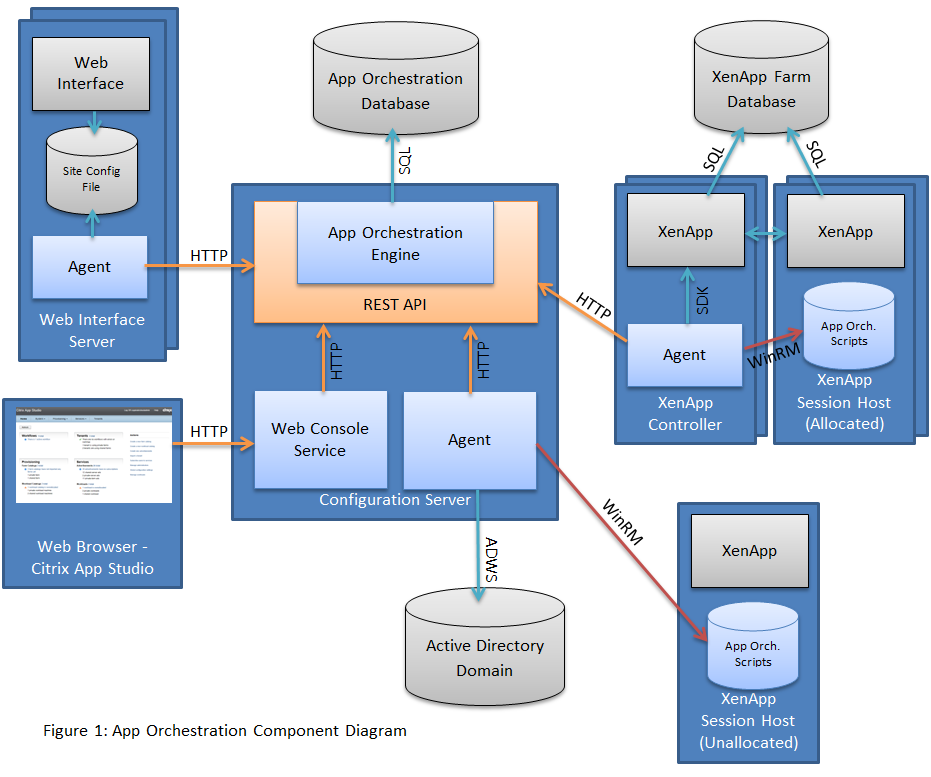
The series consist of the following posts;
- Concepts
- Architecture
- Provisioning machines Part 1 & Part 2
- Managing Tenants
- Managing Advertisements
- Managing Subscriptions
- Patching Workload Machines
- Understanding Workflows Part 1, Part 2, Part 3
- Troubleshooting (coming soon)
- Integration with CloudPortal Services Manager (coming soon)
I suggest you have a coffee and sit down and at least give the “Citrix view” a go!
//Richard
Another great blog : Virtualizing XenApp Hosted Shared Desktops on Hyper-V
Thanks a lot for this blog post!
“My latest adventure into density testing for Citrix solutions centers on XenApp (XA) Hosted Shared desktops. For those unfamiliar with the XA Hosted Shared model, it combines application and session virtualization, relying on a single OS instance on a Citrix XA server to publish familiar Windows desktops and applications. The Hosted Shared model centralizes application delivery and management (securing data and applications in the data center), and it scales well to support large user densities. It is designed to provide a locked-down, streamlined, and standardized environment with a core set of applications, making it ideally suited for task workers where personalization is less of a focus. While the XA server can be hosted directly on a bare-metal server on Windows Server 2008 R2, my recent testing explores the densities you can achieve when XA runs in a virtualized environment.”
Continue to read here!
//Richard
Vulnerability in Citrix Receiver with Online Plug-in for Windows could result in arbitrary code execution
Severity: Medium
Description of Problem
A vulnerability has been identified in the Citrix Receiver with Online Plug-in for Windows that could potentially allow an attacker to execute arbitrary code on the client device in the context of the currently logged in user.
This vulnerability is present in all versions of the Citrix Receiver for Windows up to and including version 3.2 and all versions of the Citrix Online Plug-in for Windows up to and including version 12.1.
For more information click here!
//Richard
Analysts: Windows 8 downgrade rights crucial to success
It’s an interesting point of view! Do you think that Win8 has the risk of becoming Microsofts next “Vista”?
Unless they really pull things off and gets Surface, app developers and Metro usable then I can certainly see that it may be a risk. I for sure didn’t like it but perhaps it just takes time to get used to, but is it then a success? It didn’t take many minutes to fall in love with OS X and my MacBook Air!
Analysts: Windows 8 downgrade rights crucial to success
Only future will tell…
//Richard
vCloud Architecture Toolkit (vCAT) 3.0 now available for download
Ok, this is interesting and a lot of people are sharing this right now! Read more and download it here!
“VMware is pleased to announce the release of the vCAT 3.0 material.
The VMware vCloud Architecture Toolkit provides technical and operational guidance for cloud success. It includes the tools and guidance to build, operate, and consume an industry-leading cloud computing infrastructure solution. Unlike a Reference Architecture which focuses on one use case, this architecture toolkit includes support for multiple use cases and combinations of use cases. It is based on field experience with hundreds of customers and partners. It is validated by internal and external individuals and is supported by VMware as the de-facto reference for vCloud deployments. This is offered free of charge.




 The IT Melting Pot!